Appearance
AI Should Help You Notice Connections, Not Decide What They Mean
A good answer you cannot explain
Suppose you have spent a month collecting notes on why customers leave in their first week. Interviews, support tickets, a cancellation survey, a few articles. One evening you ask an AI assistant what your notes say about it. A few seconds later you have a tidy answer: three causes, ranked, each with a sentence of explanation. It reads well. It matches your hunch. You paste it into your project document and move on.
A week later someone asks you why the second cause matters more than the third. You open the document, read your own pasted paragraph, and find you cannot say. The answer may well be right. But the reasoning that produced it happened somewhere else, and none of it happened in you.
That gap has started to show up in research. In 2025, researchers at Microsoft Research and Carnegie Mellon University surveyed 319 knowledge workers, who between them described 936 times they had used generative AI at work (Lee et al., 2025). Their summary: "higher confidence in GenAI is associated with less critical thinking, while higher self-confidence is associated with more critical thinking." They also found that the thinking people did report had moved: generative AI "shifts the nature of critical thinking toward information verification, response integration, and task stewardship."
The study has limits, and the authors list them. It is a survey of what people said about their own work, so it shows an association, not a cause. Some participants, the authors note, "conflated reduced effort in using GenAI with reduced effort in critical thinking with GenAI." The sample leaned young and comfortable with technology, and the survey ran only in English. It does not prove that AI makes anyone think less.
My reading of it is simpler than the paper's own. When the answer arrives finished, checking it becomes the job, and the thinking that would have produced it may never happen.
The usual response is to ask whether the answer was accurate. That is a fair question, and the wrong one for this problem. An accurate answer you did not work out leaves you in the same place as an inaccurate one: holding a conclusion you cannot defend. The question worth asking is a different one. Which part of the work did the AI do, and which part did you?
Two different jobs: noticing and deciding
When you work through a pile of notes, two kinds of work happen, and they are easy to blur together.
Noticing is finding what deserves a look. Two ideas keep turning up in the same notes, and you have never connected them. A term you use everywhere means one thing in your interviews and something else in your reading. A concept that was everywhere in spring has gone quiet. Noticing ends with a pointer: look here.
Deciding is working out what it means. The two ideas turn up together because one causes the other, or because they are two names for the same thing, or because you always mention them in the same breath and they have nothing to do with each other. Deciding ends with a claim: this is how they relate, and here is why I think so.
The two jobs have different costs when the work goes wrong.
A wrong pointer is cheap. You look, you see that the pair does not matter, and you move on. You have lost a few seconds, and you have kept your own judgment, because the pointer never asked you to believe anything.
A wrong claim is expensive, and a right one can be expensive too, if you did not make it yourself. Either way it settles into your notes looking like a conclusion. Later you build on it. Unless you go back and work through the evidence yourself, you have no way of telling which of your conclusions you reached and which you received.
There is another difference: where the work leaves you. Noticing leaves you facing your notes, with a question you did not have before. Deciding, when someone else does it, leaves you facing their answer.
AI is unusually good at the first job. A model can read every note in a project in seconds, and it does not get tired of comparing pairs, or bored by the same idea in its fortieth note. Software does not even need a model for much of this. Counting which ideas appear together, and which ones sit close in a network of links, is plain arithmetic.
The second job is different. It is where your understanding comes from, and handing it over does not move the understanding along with it. That is the claim this article makes: AI should help you notice connections, and leave you to decide what they mean.
The claim is not new. The clearest version of it is more than sixty years old, written long before anyone could ask a computer about their notes. The next section starts there.
Four findings about who should do what
This section only reports what four sources say. What I make of them comes at the end of it.
The machine prepares the way: Licklider, 1960
In March 1960 J. C. R. Licklider published a short paper called "Man-Computer Symbiosis" (full text). Its summary divides the work in one sentence: "men will set the goals, formulate the hypotheses, determine the criteria, and perform the evaluations. Computing machines will do the routinizable work that must be done to prepare the way for insights and decisions in technical and scientific thinking."
Later in the paper he spells out each side. People "will formulate hypotheses. They will ask questions." They "will define criteria and serve as evaluators, judging the contributions of the equipment and guiding the general line of thought." The equipment "will answer questions" and "plot graphs." His summary of its part: "In general, it will carry out the routinizable, clerical operations that fill the intervals between decisions."
To support the idea, he describes what he calls "a preliminary and informal time-and-motion analysis" of technical thinking: in the spring and summer of 1957 he tried to keep track of what he actually did during his working hours. He says he was "aware of the inadequacy of the sampling" and served as his own subject. What he found was this: "About 85 per cent of my 'thinking' time was spent getting into a position to think, to make a decision, to learn something I needed to know. Much more time went into finding or obtaining information than into digesting it." Hours went into plotting graphs, and "when the graphs were finished, the relations were obvious at once, but the plotting had to be done in order to make them so."
What you produce, you keep: the generation effect
Memory researchers have studied a finding called the generation effect since the late 1970s. A 2007 review in Memory & Cognition defines it as "the finding that subjects who generate information (e.g., produce synonyms) remember the information better than they do material that they simply read" (Bertsch et al., 2007).
The review pooled 445 effect sizes from 86 studies. Across them, the effect was 0.40, which the authors describe as "a benefit of almost half a standard deviation of generation over reading." They also found the size varied a lot with how the studies were run.
The studies themselves are laboratory tasks. In the basic version, the review explains, participants work through a list of pairs. Half are shown complete and simply read (COLD, HOT). For the rest, only the first half is shown, and participants produce the second half by a rule, such as a synonym or a rhyme. The pairs are often words, but can also be letters, numbers or equations, and some variations use sentences or arithmetic. Then participants are tested on what they remember.
Training does not prevent over-trust: automation bias
A 2010 review by Raja Parasuraman and Dietrich Manzey brought together empirical studies of how people use automated systems and decision aids (Parasuraman & Manzey, 2010).
According to its abstract, automation bias "results in making both omission and commission errors when decision aids are imperfect." It "occurs in both naive and expert participants, cannot be prevented by training or instructions, and can affect decision making in individuals as well as in teams." The authors' analysis suggests attention plays a central role, and they offer their model as a basis for "design options for mitigating such effects."
Keep the person in charge of the outcome: Lee et al., 2025
The survey from the opening section ends with suggestions for people who build AI tools (Lee et al., 2025). Two of them bear directly on this article.
The first is about responsibility: "the user should remain responsible and accountable for the outcome. AI tools must support users in actively and critically customising and refining AI-generated content."
The second is about how a tool can keep critical thinking going. The authors describe a "proactive" kind of intervention, which interrupts "to highlight the need and opportunity for critical thinking in situations where it is likely to be overlooked," and a "reactive" kind, which lets the user "explicitly request critical thinking assistance when it is consciously needed." Among the features they list are "providing explanations of AI reasoning, suggesting areas for user refinement, or offering guided critiques."
What I take from the four
That is what the sources say. The rest of this article is my reading of them, applied to a tool for notes.
From Licklider I take a division of labor that still fits. The 85 percent he describes, finding things, laying them side by side, plotting them so the relations show, is exactly the noticing work from the last section. It is the part a machine should take. Setting the criteria and judging the result stays with the person.
From the generation effect I take a careful, narrow lesson. The experiments are about remembering words, not about understanding notes, so they do not prove that writing your own conclusions makes you understand them better. What they do show is that producing something, even something small, leaves more behind than reading it. That is a reason to want the sentence that says what a connection means to be one you wrote.
From the automation bias research I take the point that matters most for design: if over-trust cannot be trained away, it is the product's job to work against it, not the user's. Defaults, labels and the order in which things appear are where that work happens.
From Lee and colleagues I take two requirements. The person should stay accountable for the result, which means the tool should make it easy to see what the AI did and change it. And the tool should prompt thinking where it is likely to be skipped, instead of only answering when asked.
Put together, these suggest what an AI feature in a thinking tool should look like. Before getting to that, it is worth being fair about where most AI note features stand today.
Where AI note features land
AI features in note apps come in a handful of familiar shapes. Each one saves real time, and none of them is a mistake. They differ in which of the two jobs they take on.
Tags and links added as you write. A model reads a new note and files it: adds tags, links it to related notes, sometimes moves it into a folder. This takes away a chore that is easy to let slide. It also creates structure you did not decide on. Where the additions are applied straight away, the structure of your notes slowly becomes the model's. Where they arrive as suggestions you accept or dismiss, the same feature stays on the noticing side.
Summaries. A long article, a meeting transcript or a pile of notes becomes a short paragraph. Summaries save reading time, and for material you only need to know about, that is all you want. For material you are trying to think with, the summary decides what mattered. If it replaces the reading instead of guiding it, what stays with you is someone else's selection.
Answers drawn from your notes. You ask a question and get an answer built from what you wrote, often with links to the notes it drew on. This is where AI can do the most, and it is the scene at the start of this article. When the answer comes with its sources and you go and read them, it is noticing at its best: it found what you had forgotten writing. When the answer is the end of the process, it is deciding, done somewhere you cannot see.
Related notes. While you read one note, a list of other notes that seem related appears beside it. This is pure noticing. It asks nothing of you except a glance, and it is easy to ignore when it is wrong.
The pattern is not about which feature a tool has. The same capability can sit on either side of the line, depending on a few design choices: whether its output is a pointer or a claim, whether it takes effect before you agree, and whether you can see what it is based on. Those choices can be written down as tests.
Six tests for AI in a thinking tool
These six follow from the findings above. Each comes with a way to check it in a few minutes, on any app you are considering. Two of them, the fifth and sixth, overlap with tests in an earlier article on personal knowledge engines, which looks at the same problem from the side of what gets stored.
1. It points; it does not conclude
AI output in a thinking tool should end in something you have to do: a pair worth looking at, a question to answer, a note to reread. Where it does interpret, it should be clear that this is an interpretation, one reading among possible readings, not a finding. This is Licklider's division in its plainest form, and it is close to the "proactive" kind of intervention Lee and colleagues describe: drawing attention to a moment where thinking is likely to be skipped.
How to check. Ask the AI about a connection in your notes. Read the last sentence of its answer. Does it hand you a conclusion to accept, or a question you have to answer?
2. Nothing becomes structure until you say yes
Suggested tags, links, concepts and groupings should arrive as proposals, and stay proposals until you accept them. Accepting should take a deliberate step, and the default should be "not accepted." This is the design side of the automation bias finding: since training does not prevent over-trust, the default has to do the protecting.
How to check. Run a feature that organizes your notes. Before you click anything, look at your notes. Has anything already changed?
3. Every suggestion shows what it is based on
A proposed connection should come with the notes, or the passages, that led to it, one click away. Without them, the only way to evaluate the suggestion is to trust it. With them, checking takes a minute, and the checking is the thinking. It also serves the shift Lee and colleagues found, where more of the work becomes verification: a tool can make that part cheap.
How to check. Pick one suggestion. Count the steps from it to the sentence in your own notes that it rests on.
4. Cheap signals first, the model last
A lot of noticing does not need a model. Which ideas appear together, which ones have grown or gone quiet, which notes share the most concepts: these are counting, and counting is exact, free, and easy to check. A good tool shows you these first, and brings in a model only where counting runs out, such as reading meaning or putting a pattern into words. This is the routinizable work in Licklider's sense, done by the cheapest machinery that can do it, and it means the structure of your notes is still visible to you when the AI is switched off.
How to check. Turn the AI features off, or imagine you never set them up. What can the tool still show you about how your ideas connect?
5. Machine-written text stays marked until you make it yours
When AI writes into your notes, a draft definition, a summary, an explanation, that text should carry a mark that says so, and making it yours should be something you do. Months later, the difference between a sentence you wrote and a sentence you accepted is invisible on the page unless the tool keeps it visible. The generation effect is one reason to care. If producing beats reading, it is worth being able to tell which sentences you produced.
How to check. Let the AI write something into a note. Come back the next day. Can you tell, from the note alone, which part was written by the AI?
6. Your "no" is remembered
Rejecting a suggestion is a judgment, and judgments are the part the tool should keep. A rejected suggestion that comes back every time the analysis runs again teaches you to stop rejecting, and that ends in accepting by default. This test is the accountability point from Lee and colleagues, applied to the smallest decision you make.
How to check. Reject a suggestion. Run whatever produced it again. Does it come back?
None of the six asks the AI to be less capable. A tool can pass all six with a strong model, and fail all six with a weak one. They are about where the model's work ends and yours begins.
How Jotaid answers the six tests
I build Jotaid, so this section is the app grading its own homework. It uses the same six tests, and it marks the places where the app falls short. Every feature that sends your notes to a language model needs Pro and an API key from a provider you choose. Everything else, including an index that runs on your device, is free.
1. It points; it does not conclude ⚠ mostly
The clearest case is the AI reading in the information panel beside the graph and the co-occurrence matrix. It is built in three parts. First, a few short points about what the pattern might mean, under a heading that starts with "AI:". Then a single question, set apart from the points. Then one next step, naming specific concepts. The question is the part that matters for this article. It gives no answer. It puts in front of you a choice you may not have noticed you were making. For a concept called Perceived value in a sample project, it asked: "Is perceived value something you price, or something you design?"
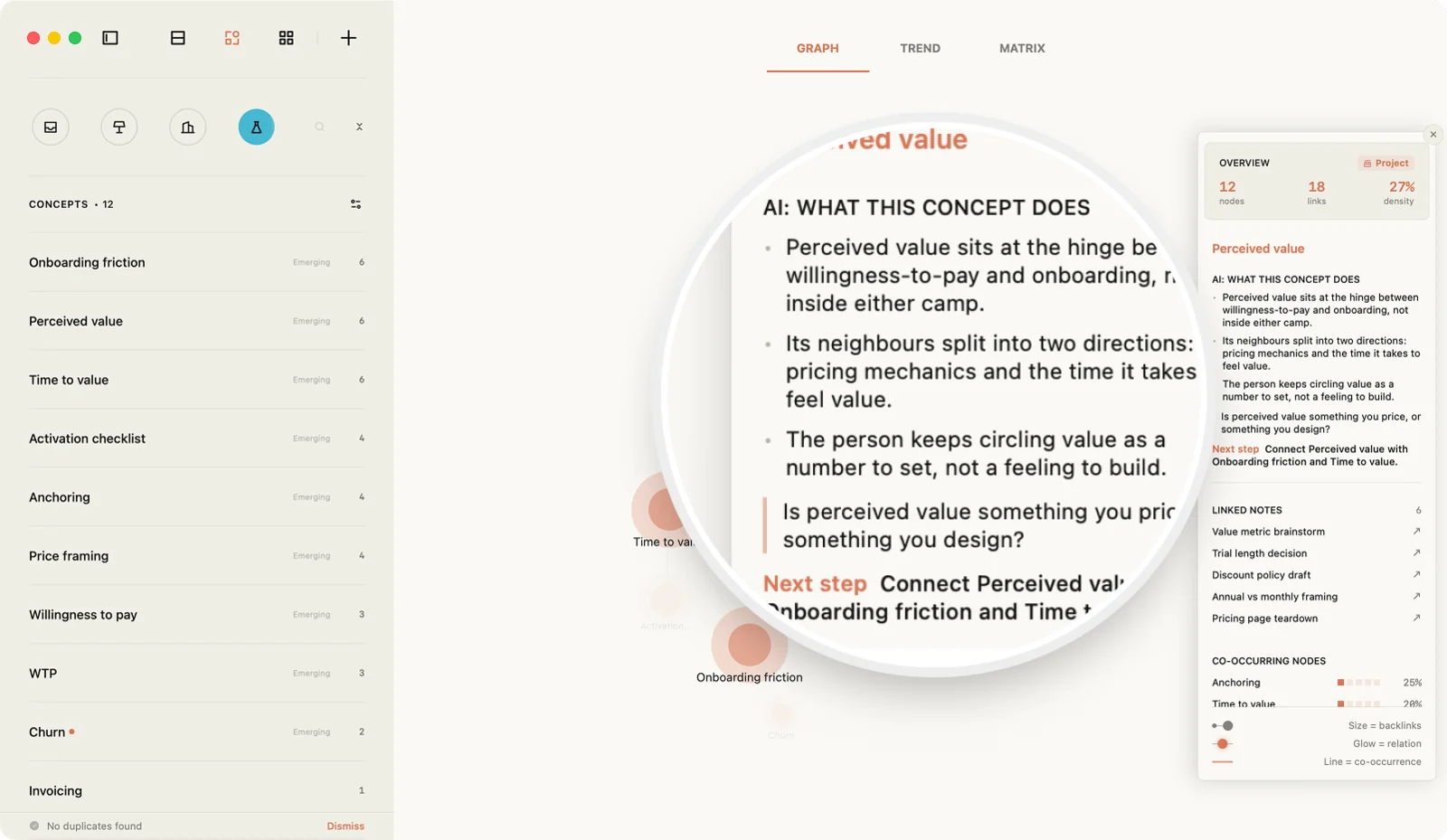
The points do interpret. That is deliberate, since the numbers on the panel already say what the pattern is, and the AI's job is to suggest what it might mean. They are labeled as AI, kept short, and followed by a question that hands the matter back to you.
Two places lean further toward concluding. On a concept's Co-occurrence tab, each related concept gets a one-sentence description of the relationship, such as "Anchoring is an application of Perceived value." It is written as a plain statement, and it loads as soon as the row is on screen. Relation types work the same way: when you run the analysis, the AI proposes a type for a pair, such as application, contrast or dependency. Both are interpretations presented in the grammar of fact, and they are the first thing to read with suspicion.
2. Nothing becomes structure until you say yes ⚠ mostly
The features that change the shape of your notes ask first. Smart Node reads a project and proposes concepts, each with the notes that mention it. Smart Theme proposes groups of notes. In both, nothing is ticked by default, and only what you tick is created. The guide gives the reason for Smart Theme in one line: "ticking by default would let the AI rearrange your canvas for you, and themes should be your own thinking" (AI Features). Suggested tags, which are worked out on your device without a model, appear as outlined chips under the tag field, and none is added until you click it (Tags).
Two things happen without a yes. When a note is still called "Untitled," the automatic title feature fills in a title for it once. It is on by default, it never replaces a title you wrote, and you can turn it off in the AI settings. And relation types, once you press Analyze, appear without being accepted one by one. You can reject each of them, but there is no step where you accept them, and no button yet to mark one as confirmed.
3. Every suggestion shows what it is based on ✓
Every place where Jotaid points at a connection leads back to your notes. Select a cell in the matrix and its panel lists the notes the two concepts share. A link prediction lists the concepts behind it, with the rarest first, so you can see why the pair was proposed (Link Predictions). A related note is labeled with where it came from: notes that share concepts you linked, notes the on-device index judges similar in meaning, or near-duplicates (Semantic Relations). A proposed relation type comes with the passage it was read from. And Smart Node shows, for each proposed concept, the notes that mention it.
4. Cheap signals first, the model last ⚠ mostly
Most of what Jotaid shows about how your ideas connect involves no model at all. The co-occurrence matrix counts which concepts appear in the same notes. Link predictions come from the shape of your network, and the guide is explicit that "this layer is not AI." The Core, Bridge and Emerging badges are read off the network. The Trend view charts how often each concept is mentioned over time. Plain-text mentions of a concept are found by exact matching, and turned into links in one click. Related notes are worked out on your device by Apple's built-in model, with no network and no cost.
All of that is free. The guide puts the line in one sentence: "analysis of a network you built by hand is free; having the AI build it for you is Pro" (Free vs Pro). Switch the AI off, or never set it up, and the structure of your notes is still in front of you.
There is one exception to "the model last." With Pro, the AI reading of a whole project's overview runs on its own when you open it, so you will see an interpretation before you have asked for one. Readings for a single concept or a single matrix cell run only when you press the button.
5. Machine-written text stays marked until you make it yours ⚠ mostly
Two features write into your notes. Enrich Content drafts the body of a concept from the notes that cite it. Theme Summary reads every note under a theme and writes a summary into the theme note. Since version 1.2.2, text from either one arrives marked as an AI draft, "so neither you nor an agent mistakes it for your own conclusion," in the words of the release notes. Delete the marker line, and the text is yours (release notes).
That fixes a gap the personal knowledge engine article pointed out, when both features wrote ordinary, unmarked text. The readings and relation descriptions never enter your notes. They stay in the panels, where they are labeled as AI.
One feature edits a note without a mark. Smart Format turns a hurried note into structured Markdown: headings, lists, tables, paragraph breaks. Its guide sets a hard rule that it "adds, deletes or alters no text," and ⌘Z undoes it (Smart Format). It also adds bold or highlighting to key terms, and that is a small judgment about what matters in your note, made without a mark. Look at what it emphasized before you keep it.
6. Your "no" is remembered ✓
Reject a relation type the AI proposed, and Jotaid records that you rejected it. Run the analysis again later, on more notes or with a different model, and the rejected relation does not come back. Rejected relations survive restarts too.
The score
Two tests pass outright, and four pass with exceptions you should know about. The exceptions share a shape: an interpretation that appears before you asked for it, a sentence that reads as fact, or a judgment made in your note without a mark. That is worth keeping in mind when you use the app, and it is the list of things I want to change in it.
A twenty-minute session
Here is one way to use AI for noticing and keep the deciding for yourself. It works in Jotaid, and the order of the steps carries over to most tools.
1. Let counting find the candidate. Open the co-occurrence matrix for a project and look for one cell worth a question: a bright cell between two clusters, a pair flagged as highly similar, or a pair you are surprised to see together at all. Nothing here has used a model yet.
2. Read the evidence before any interpretation. Select the cell. Its panel lists the notes the two concepts share. Open two or three of them and read the passages where both ideas appear. This is the slow part, and it is the point of the session.
3. Write your own sentence first. Before asking the AI anything, write one or two sentences about what you think the connection is, and why. Put them in the theme note that gathers this line of thinking, and name both concepts with [[ ]]. Because the note names both, it becomes one of the notes they share, so your sentence will be among the evidence the next time anyone opens this pair, you included. If you are not sure, write the question instead. A question you wrote is still yours.
4. Then ask for the reading. With Pro, press the button for the AI reading of that cell. Compare its points with your sentence. Where it saw something you missed, go back to the notes and check it. Then answer the question it ends with, in the same theme note, in your own words.
5. Clean up what the AI proposed. If you run the relation analysis, read the proposed type for this pair and the passage it came from. Reject it if it is wrong. The rejection is kept.
That is the session. Afterwards, the matrix still shows the same counts, the AI reading is still in the panel, and the only new sentences in your notes are ones you wrote. Steps 1 to 3 need no AI and no Pro. You can do them on the free tier, and they are most of the value.
The order matters more than the tool. Evidence before interpretation, your sentence before the AI's, and the AI's reading as something to argue with, not something to copy.
What this approach doesn't do
It does not make over-trust go away. The research says training does not prevent automation bias, and nothing in this article claims that labels and defaults do either. They make it easier to notice when you are about to accept something unexamined. They do not stop you from accepting it.
The evidence is indirect. The generation effect comes from memory experiments with word lists. The survey of knowledge workers rests on self-report, and can show a correlation but not what caused it. Licklider's paper is a vision, supported by one informal study of his own working days. Together they make a strong argument, not a proof.
Sometimes the finished answer is what you want. When you just need the gist, a summary or a direct answer is the right tool, and making yourself work through the source would be a waste. The six tests matter where the material is something you have to reason with.
It needs concepts you have named. Counting can only find connections between ideas you have marked. If your notes have no [[ ]] links, there is nothing for the matrix to count, and the noticing has to come from somewhere else, from search, from rereading, or from a model.
Your notes go to the provider you choose. When you use an AI feature in Jotaid, the notes it reads are sent from your device to the AI provider you set up, under that provider's terms. The counting, the predictions and the on-device index send nothing anywhere.
The paragraph you could not explain
Go back to the opening: the tidy answer about why customers leave, pasted into a document, that you could not defend a week later.
Now imagine the same month of notes, handled the other way. The matrix shows that onboarding friction and time to value turn up together in note after note, and that price rarely appears with either. You read the notes behind the bright cell. You write a sentence: people leave before they reach the point where the product saves them time, and price is the reason they give afterward, not the reason they leave. The AI reading adds a point you had not considered, and asks whether your support tickets agree. You go and check.
A week later, someone asks why. This time the answer is in a note you wrote, beside the evidence it came from, and you can explain it, because you were the one who worked it out. The AI did a lot of work along the way. It just never did the part that was yours.
Frequently asked questions
Does Jotaid's AI write my notes for me?
Only when you ask, and what it writes is marked. Enrich Content can draft the body of a concept, and Theme Summary can write a summary into a theme note. Since version 1.2.2, both arrive marked as an AI draft until you delete the marker line. Smart Format restructures a note's Markdown without changing its words. The AI readings and relation descriptions stay in their panels and never enter your notes.
Can I use Jotaid without any AI?
Yes. The co-occurrence matrix, the graph, link predictions, the Core, Bridge and Emerging badges, the Trend view and related notes all work without an AI provider, and all are part of the free tier. The AI features need Pro and an API key from a provider you choose.
Are the matrix and link predictions AI?
No. The matrix counts how often concepts appear in the same notes, and link predictions come from the shape of the network of links you made. Neither calls a model. Related notes are computed on your device by Apple's built-in model, without a network connection.
What happens when I reject an AI suggestion?
Proposed concepts and themes that you do not tick are never created. A relation type you reject is recorded as rejected, and it does not come back when the analysis runs again, even on more notes or with a different model.
Where do my notes go when I use an AI feature?
From your device to the AI provider you set up, using your own API key. They do not pass through a Jotaid server.
Sources
Every quotation in this article comes from these sources:
- J. C. R. Licklider, "Man-Computer Symbiosis," IRE Transactions on Human Factors in Electronics, HFE-1, March 1960. Full text.
- Sharon Bertsch, Bryan J. Pesta, Richard Wiscott and Michael A. McDaniel, "The generation effect: A meta-analytic review," Memory & Cognition 35(2), 2007. doi:10.3758/BF03193441.
- Raja Parasuraman and Dietrich H. Manzey, "Complacency and Bias in Human Use of Automation: An Attentional Integration," Human Factors 52(3), 2010. doi:10.1177/0018720810376055. Quoted from the published abstract.
- Hao-Ping (Hank) Lee, Advait Sarkar, Lev Tankelevitch, Ian Drosos, Sean Rintel, Richard Banks and Nicholas Wilson, "The Impact of Generative AI on Critical Thinking: Self-Reported Reductions in Cognitive Effort and Confidence Effects From a Survey of Knowledge Workers," CHI 2025. doi:10.1145/3706598.3713778.
Cover photo from Unsplash.