Appearance
Folders, Tags, Files, Entities: Four Ideas of What a Note Is
Four apps, four structures, four sets of questions you can and cannot ask. The most interesting one is the app you already have open.
Key takeaways
- Each app asks a different question when you file a note: Apple Notes asks where it goes, Bear what it is about, Obsidian what it is called and what it points at.
- A container answers "where is it?", a tag "what else is like this?", and a link graph "what did I connect?" Each answers exactly that, and no more.
- In Jotaid, Projects, Themes and concept nodes are all notes or records you can write in, and a concept that is a record is what lets the software compute how concepts relate.
- The question none of the first three structures can hold arrives later, around note two hundred: what does this have to do with everything else I've written?
The pause before you file
You finish writing something down and there is a small pause before you put it away.
In Apple Notes the pause is which folder. In Bear it is which tags. In Obsidian it is what do I call this file, and does it go in a folder I'll regret. The pause is short and you barely notice it, but it isn't hesitation — it's the app asking you a question, and the question is different in each one.
That question is the most consequential thing about a notes app, and it is almost never what the comparison articles are about. Feature tables make these four products look like variations on a theme: they all hold text, they all sync, three of the four now do [[wikilinks]], and every one of them will let you find a note you wrote in 2023. The differences that actually change your work aren't in that list. They're one level down, in what each app believes is the thing being stored.
Get this wrong and you will spend a year fighting a tool that is working perfectly — perfectly at a job that isn't yours.
This piece does three things. It draws the four structures as each product actually stores them, without scoring them. It follows each structure to the questions it makes easy and the questions it makes impossible. And then it spends the last third on the one that matters most, which is not the most powerful of the four — it's the one that came preinstalled.
I built one of these four, so read the last part with that in mind. The first two parts would be the same if I hadn't.
Four structures
Take the same material — a few dozen notes about one piece of ongoing work — and put it into each app. Here is what is actually on disk afterwards.
Folder and Jotaid's Project are solid boxes because both are real containers with a place of their own; Bear's #project/theme is drawn dashed because the tag is typed into the note's own text — the sidebar hierarchy it produces is real, but it is assembled from strings living inside notes. The six Obsidian dots are deliberately the same size: that is what its graph looks like, because every edge in it is a link and nothing else. In the last column, three lines converge on the [[node]] circle — in Jotaid that node is a record in its own right, not a reference pointing at a file.Four sentences, one per column, and each one is a design decision rather than an oversight.
Apple Notes: the container is the structure. A folder is a real place. A note is inside exactly one of them, folders nest inside folders — Apple's own instruction for making a subfolder is to "drag the folder on top of the other folder" — and Smart Folders let a saved search behave like one. Since 2023 you can also link one note to another by typing >>. What Apple documents is how to make that link. It does not document any way to see what links back.
Bear: the tag is typed into the note. You write #project/theme in the body, anywhere you like — Bear's own guide says tags can go "anywhere in a note, even in headings and paragraphs." The slash is not decorative: Bear's documentation is explicit that it "tells Bear to manage the tag as a hierarchy," parent and child, with disclosure triangles in the sidebar "just like folders in a typical file structure." So the nesting is genuine. What the tag doesn't have is a body. There is no page called project/theme that you can write a paragraph into; it is a name that gathers notes, and the notes hold all the text there is.
Obsidian: the file is the unit and the link is the structure. Notes are markdown files in a folder you own — that is the entire point, and it is why the app has the following it has. Folders exist and you can use them. They simply have no role in the link graph: every edge in that graph is a [[link]] someone typed, and nothing else. The canvas is real but sits beside this rather than inside it, saved as its own .canvas file in an open JSON format Obsidian published for anyone to use.
Jotaid: everything in the structure is writable. A Project is a note. A Theme is a note. Both hold text of their own, so a container is somewhere you can write a paragraph about what that container is for. And when you type [[attention residue]], the node becomes a record too — not a name attached to files, but a page with its own body, its own history and its own neighbourhood, created at the moment you typed the brackets and not a moment later. Four levels, and there is somewhere to write at every one of them.
What each structure makes easy, and what it makes impossible
Structures don't have opinions about features. They have consequences, and the consequences are mostly predictable from the drawing above.
A container answers "where is it?" and nothing else. Folders are the most legible structure ever invented for personal files, and their legibility comes from a restriction: a thing is in one place. That restriction is why you can always find something, and it is also why a note about a hiring decision that was really about writing culture has to pick a side. Every note that belongs in two places is a small unresolved argument with your own filing system, and after a few hundred notes those arguments are most of what the system contains.
A tag answers "what else is like this?" and stops there. Tags fix the one-place problem completely — a note can carry as many as you like — and Bear's nesting gives them a shape besides. What they cannot do is accumulate. Tag two hundred notes #writing-culture and you have a list of two hundred notes; the tag itself knows nothing more than it did at note one. Nothing has been said about writing culture anywhere, because there is nowhere to say it. The tag is an excellent index and a poor author.
A link graph answers "what did I connect?" — exactly that, and no more. This is the real advance of the last decade and it should be credited properly: making the double bracket cheap turned linked notes from a discipline into a habit. But a graph built purely from links can only ever report the links. It cannot tell you which of two thousand of them is load-bearing, which two concepts have drifted into being the same concept under two names, or which pair everything around them says should meet and hasn't. Those are questions about the shape of the network, and a picture of the links contains the answer without computing it. (That argument has its own essay: why backlinks are not the same as relationships.)
Making the container a note changes what a container can do. If a Theme is itself a note, then "the writing culture theme" has a body, and the body is where the claim goes: not a list of two hundred notes but a paragraph saying what those two hundred notes turned out to mean. The list still exists underneath. The difference is that the structure now has somewhere to hold a conclusion, so the collection can get denser rather than only longer.
The same is true one level further down, and that level is the one people miss. A concept node in Jotaid is not only an index entry — it has a body too, with its own editor, its own edit history, its own timestamps. So [[attention residue]] is somewhere you can write the two sentences that say what you now think attention residue is, distinct from any note that happens to mention it, and distinct from the theme it sits under.
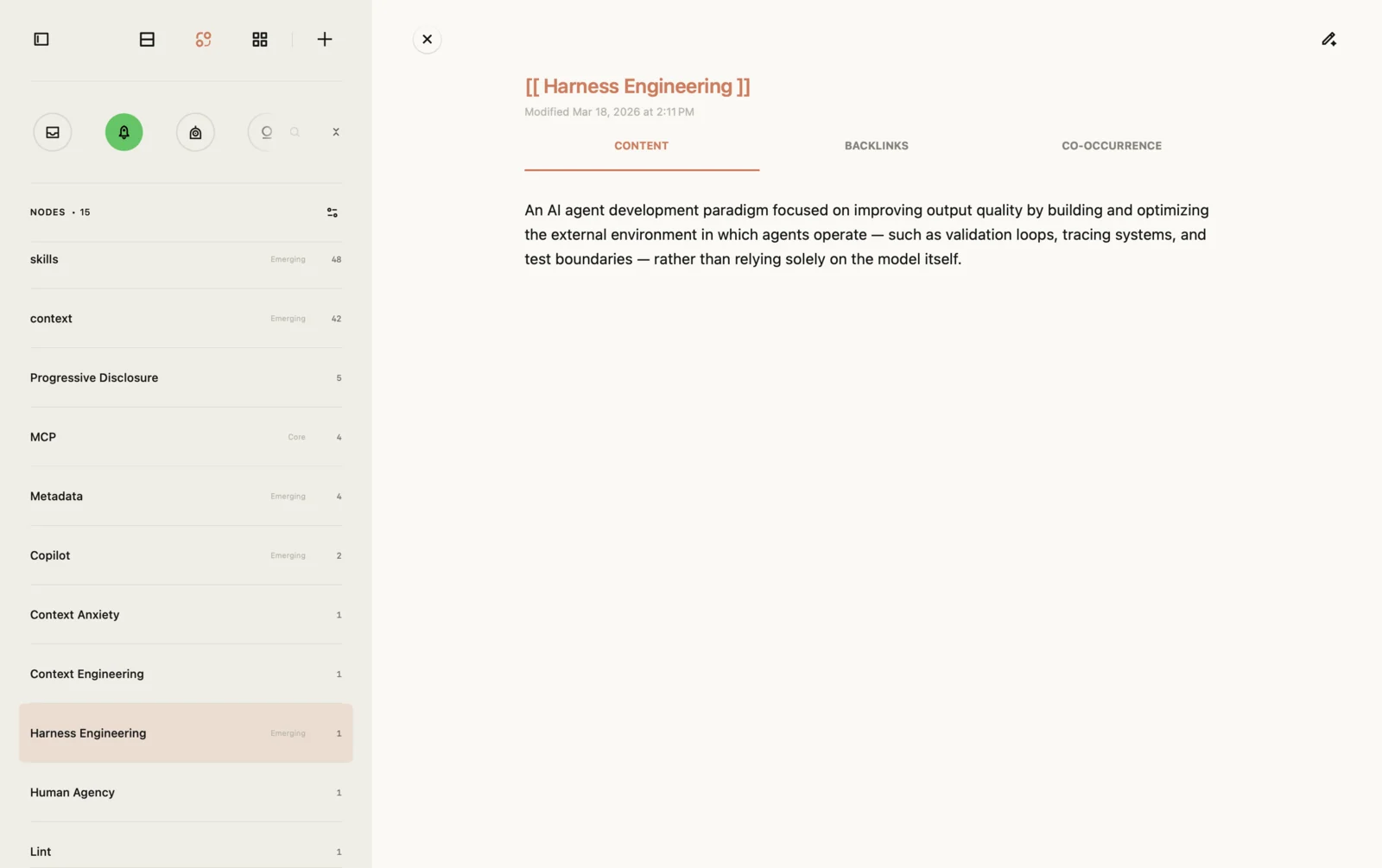
Harness Engineering, open. It has a modified timestamp, three tabs of its own, and a paragraph nobody wrote in a note — that definition lives on the node. Note the left column: fifteen nodes, each carrying a reference count and, where the network warrants one, a role badge (Core for MCP, Emerging for the ones picking up references this fortnight). None of that is available for a tag.Follow the consequence. In a tag system the definition of an idea is nowhere: it is distributed across every note that used the tag, and reconstructing it means rereading them. In a file-based system the definition can exist, but only if you remember to create the file — until then the concept is a name in someone else's paragraph. Making the node a record from the instant you type the brackets means the place to put the definition already exists before you know you need it, which is precisely when you tend to have the thought.
Count the levels: a Project you can write into, a Theme you can write into, a note, and a node you can write into. Four places where a conclusion can live, versus one.
And making the concept a record is what lets the software compute. A tag is a string; you can count strings. A node with its own identity, note set and neighbourhood is an object you can do arithmetic on: how often two of them appear together relative to how often either appears at all, which ones sit between clusters that otherwise never meet, which pair shares many neighbours and has never once co-occurred. None of that is exotic — it is ordinary network analysis, decades old — but it requires the concept to exist as something more than a word inside files.
That is the whole trade, and it runs in both directions. Plain files on your own disk will still open in thirty years, which no database can promise. A structure rich enough to be queried is a structure you have to be given rather than one you can cat. Neither of those is the wrong answer; they are answers to different questions.
The capability table, and what it doesn't say
Structures are the argument; capabilities are the evidence. Below is what each product ships built in — no plugins, no scripts, no workarounds. That restriction matters and I'll come back to it, because for one of these four it isn't a fair way to be measured.
| Capability | Apple Notes | Bear | Obsidian | Jotaid |
|---|---|---|---|---|
| Markdown source editing | — | ● | ● | ● |
| Backlinks (see what points here) | — | ● | ● | ● |
| Knowledge graph | — | — | ● | ● |
| Container that is itself a note | — | — | via plugin | ● — Themes free, Projects Pro |
| Concept becomes a record with a body of its own | — | a note you create | a note you create | ● |
| Structural views over one dataset | 1 · list | 1 · list | 2 + a separate canvas file | 3 · Note (list), Node (graph), Theme (canvas) |
| Spatial canvas of notes | — | — | ● separate .canvas file | ● |
| Relation analysis: co-occurrence, bridges, link prediction | — | — | — | ● |
| Markdown export in bulk | one note at a time | ● | already files | ● |
| Folder import builds a hierarchy | — | — | folders stay folders | ● Pro |
| Cross-platform (Windows / Android) | — | — | ● | — |
| Plugin ecosystem | — | — | 6,800+ | built in |
Reading notes. Bold is Jotaid; anything not marked Pro is in the free tier, and the two things that are marked are the only rows where the paid unlock changes the answer. A dash means the product doesn't offer that as a built-in capability — where something adjacent exists, the cell says what it actually does rather than pretending there's nothing there. Apple Notes really does export Markdown, for instance — just never more than a single note per trip through the menu, which is a different limitation from the one people assume.
Two rows deserve more than a symbol.
Cross-platform is a real gap and it is mine. Obsidian runs on Windows, Linux and Android because it was built on web technology, and that decision bought reach at a cost in platform fidelity — a trade its users made knowingly. Jotaid made the opposite trade and inherits the opposite limitation: if your work lives on a Windows machine, none of this essay is useful to you, and no amount of argument changes that.
The plugin row is not a gap in the same sense — and it is also the row that could invalidate the rest of the table. With more than six thousand community plugins, "Obsidian can't do that" is almost never a true sentence. Someone has built a co-occurrence plugin. Someone has built folder notes. The honest claim is narrower and worth stating plainly: the table measures what arrives when you open the app, and Obsidian's answer to most of these rows is you can assemble it. Whether that is a feature or a tax is genuinely a matter of temperament, not a matter of fact. Some people find the assembling to be the fun part. Others discover a year later that they spent more time configuring the tool than writing in it.
So the table is not a scoreboard. It's a description of what each product decided to hand you already built.
Who should keep using what
Two of these four are not the point of this piece, and it would be dishonest to leave them as columns in a table.
Bear, if the work is writing. Bear is the best-made writing surface of the four, and the craft in it — the typography, the way markdown hides itself as you type, the editing keyboard — is not decoration; it is the product. Its tag system has been refined for years and does something folders can't: a note can carry as many tags as it deserves, and the nesting gives that flatness a shape. Bear 2 added backlinks and a table of contents in the info panel, so "it doesn't do links" stopped being true in 2023. It exports Markdown in bulk, including everything at once, so nothing you put in is trapped.
What Bear doesn't have is anywhere to put a conclusion. The tag gathers; it cannot say. If your work is producing good writing and finding it again later, that gap will never once bother you, and you should stay where you are.
Obsidian, if ownership and reach come first. The files are yours, in a folder, in a format that will open in thirty years without anyone's permission. That is not a feature — it's a commitment, and it is why the app earned the following it has. Add the plugin ecosystem and cross-platform reach and you have something no single-vendor app can match on its own terms.
The costs are the mirror image, and Obsidian users are usually the first to name them: the graph draws your links without analysing them, and getting the tool into the shape you want is a project of its own. Whether that project is a pleasure or a drag is the actual dividing line — not any row in the table above. A closer comparison of the two models deserves its own piece rather than a paragraph in this one, and now has one.
That leaves the column most people skip, which is the one this essay is really about.
What Apple Notes actually did
Apple Notes is the most-used notes app in the world by a margin nothing else in this comparison approaches, and the usual reason given — it comes preinstalled — is both true and the least interesting thing about it.
Look at what Apple has actually shipped into it over the last five years. In 2021 the Notes app got tags, a tag browser, and custom Smart Folders that gather notes by tag automatically. It got Quick Note, a floating window you can pull up without leaving whatever app you are in. In 2023 it got links from one note to another, with >> as the shortcut. The most recent additions carry on in the same direction: links to a section inside a note, and Markdown on the clipboard in both directions.
Read that as a five-year campaign rather than a changelog. Tags, saved queries, links between notes, Markdown — every one of those ideas came out of the same tradition this essay has been describing, and Apple put all of them on a billion devices, for free, with no manual. Apple Notes has done more to normalise the idea that notes can be tagged, queried and linked than every dedicated PKM app combined. People arrive at tools like mine already knowing what a link between two notes is for, and that is largely Apple's doing.
Which makes it worth being exact about where it stops, because the stopping point is not a missing feature. It's the model.
You can make a link. Apple's documentation for the Notes app describes how to create one, how to name it, how to edit and remove it. There is nothing in it about seeing what links back — no incoming references, no list of the notes that mention this one. And once that isn't in the model, everything downstream of it is unavailable too: no graph, because there is no link index to draw; no way to ask which of your ideas keep turning up together; no way to notice that two folders have been quietly converging for six months.
None of that is an oversight. Look at the first column of the drawing again: the structure is containers, and a container answers where is it. Apple built an outstanding answer to that question and then, sensibly, added links on top for the times you want to jump somewhere. What it has never done is store the links as a structure of their own — and you cannot query a structure that isn't there.
Here is how the limit actually shows up, and you have almost certainly felt it. You make a folder called Misc, or 2024, or Work — old. You tag something three ways because it genuinely belongs in three places, then never look at any of the three again. You remember writing something relevant last spring and search for a word you're no longer sure you used. Each of those is the same event: a note that had a relationship to something, and nowhere for the relationship to live.
The next step doesn't cost anything
The reason Apple Notes is the interesting column is that most people who eventually want more than it offers assume the next step is a project: new app, new vocabulary, migration weekend. For the part that actually matters, it isn't.
Jotaid's free tier is a single project — the Inbox — and inside it nothing is withheld:
- A full Markdown editor — source, with live syntax highlighting, and a separate preview. Not a subset: headings, emphasis, strikethrough,
==highlight==, task lists, tables with column alignment, fenced code blocks with language tags, images, block quotes, footnotes and abbreviation definitions, super- and subscript, inline HTML like<kbd>and<mark>, emoji shortcodes, LaTeX maths with$…$, and Mermaid diagrams from a```mermaidfence. - Nodes. Type
[[attention residue]]into a note and that concept becomes a node — a record with a page of its own, a body you can write in, a list of every note that mentions it, and a neighbourhood. Rename it once and it changes everywhere. - Backlinks, plus unlinked mentions — notes where you wrote the words and never made the link, found by a plain scan, with a one-click fix on each row.
- Themes: containers that are themselves notes, so the container has a body you can write a conclusion into. You can create as many as you want inside the Inbox.
- The canvas: the same notes as cards on a surface you can arrange by hand.
- The graph, and the co-occurrence matrix — a score for every pair among the nodes you reference most, on one comparable scale.
- Structural roles and link prediction: which nodes are load-bearing, which are brokers between otherwise separate groups, and which pairs share many neighbours yet have never once appeared in the same note.
- A network read-out that will tell you when your notes have become an echo chamber, or when there isn't enough there yet to conclude anything.
- An on-device semantic index — related notes and tag suggestions computed locally, nothing leaving the machine.
- iCloud sync for that project, and bulk Markdown export whenever you want to leave.
That is the whole method, not a trial of it. There is no note limit, no expiry, and no feature in the list above that turns off later.
What the paid unlock adds is narrow and worth stating plainly so you can decide whether it applies to you: more than one project (and sync for those), AI features on an API key you supply yourself, bulk-moving notes into a project, and importing a folder so its subfolders become Themes automatically. Two of those are conveniences for people running several separate bodies of work at once; one is optional AI; one is a migration accelerator.
If you have one body of work — one research project, one book, one job — the free tier is not a lesser version of the product. It is the product, scoped to one project.
Keep Apple Notes
I mean that literally, and not as a courtesy.
Read the Notes section of Apple's own iPhone user guide and the list of things it does is longer than most people realise: drawings and handwriting, formulas, recording and transcribing audio, scanning text and documents, working with PDFs, sharing and collaborating on notes and folders, locking a note behind Face ID, Quick Note from inside any other app, and now creating notes by talking to Siri.
Jotaid does none of those. Not "does them worse" — there is no Apple Pencil support, no document scanner, no audio recording, no shared notes, no locked notes, and no system-level capture surface. Some of that is a roadmap; some of it is never. And a few of those aren't Apple-exclusive either — Bear has drawing and document scanning too.
More to the point, none of them are the same job. Handwriting a diagram in a meeting, scanning a receipt, and sharing a packing list with your family are capture and coordination. They are things you do with other people or with the physical world, and Apple Notes is exceptionally good at them because it can reach into the operating system in ways a third-party app simply cannot.
So the honest recommendation is not migration. It's division of labour.
Keep Apple Notes for what it is unbeatable at: anything shared, anything handwritten or scanned, anything you need to capture in four seconds from the lock screen. Use something like Jotaid for the one body of work you are actually trying to develop into a position — the research, the book, the strategy, the thing you will eventually have to write down and defend.
This also happens to dodge the worst part of switching. Apple Notes exports Markdown one note at a time, which makes bulk migration out of it genuinely tedious, and no argument in this essay is worth a weekend of that. Don't move your archive. Leave five years of receipts, packing lists and meeting scribbles exactly where they are, and start the next project somewhere the relationships have a place to live. If in three months the new place has earned it, you'll know. If it hasn't, you lost nothing but a few notes you can export in bulk and take with you.
For those who do already have a folder of Markdown files, dragging that folder in turns its subfolders into Themes automatically — that one is part of the paid unlock. Without it, importing files into the Inbox and grouping them into Themes by hand works fine and costs nothing but a few minutes. Either way, any [[wikilinks]] already in those files become concept nodes as they land, so a vault arrives with its network intact rather than as plain text that merely looks linked.
The pause, again
Go back to the pause before you file something.
Apple Notes asks where does this go, and folders are a genuinely excellent answer — legible, fast, and understood by everyone who has ever used a computer. Bear asks what is this about, and answers it more flexibly than folders can. Obsidian asks what is this called and what does it point at, and hands you the files so nobody can ever take them away.
The question none of the first three can hold is the one that arrives later, usually around note two hundred: what does this have to do with everything else I've written? Not "where is it" — you can already find it. Not "what is it about" — you already tagged it. What it has to do with the rest, on what evidence, and whether that has changed since you last looked.
Answering that requires the node — the concept itself — to be a record rather than a word, and the container to be a note rather than a box. That is the entire difference between the fourth column and the other three, and everything else in the table follows from it.
If you have been feeling that pause get longer, the next step is free and it's one project wide.
Jotaid — concept nodes, backlinks, canvas, graph, co-occurrence and an on-device semantic index, in one project, with no limit and nothing that expires. Bring a week of notes and see whether your own material has anything to say back.