Appearance
Jotaid vs Obsidian: Two Models of Connected Thinking, and How to Use Both
I build Jotaid, so read this with that in mind. Everything said here about Obsidian comes from its own help pages, and every claim about Jotaid can be checked against its guides, linked as we go.
The short answer
Choose Obsidian if you want your notes to be plain Markdown files in a folder you control, on any platform, shaped by plugins into whatever system you have in mind.
Choose Jotaid if you work on a Mac and an iPhone, and what you want is for the ideas that keep recurring across your notes to become objects of their own, with the app working out which of them belong together.
Use both if your vault is your archive and you want to develop one body of work in a different way. Your vault does not have to move. On the Mac, Jotaid imports a copy of a folder, and notes export back out as Markdown.
The rest of this article explains where those answers come from. It starts with one link, typed the same way in both apps.
One link, two apps
Suppose you are researching pricing. Over a few weeks you write three notes:
- Interview with a customer, where you notice that people judge the price against how much the product seems to save them. You write
[[Perceived value]], and further down,[[Onboarding friction]]. - Pricing page teardown, where
[[Perceived value]]comes up again, next to[[Anchoring]]. - Churn review, where
[[Onboarding friction]]comes up on its own.
These are the same keystrokes in both apps. The double brackets look identical, and in both apps the editor offers to complete the name as you type. What each app makes of them is where the two part ways.
In Obsidian: a link to a file
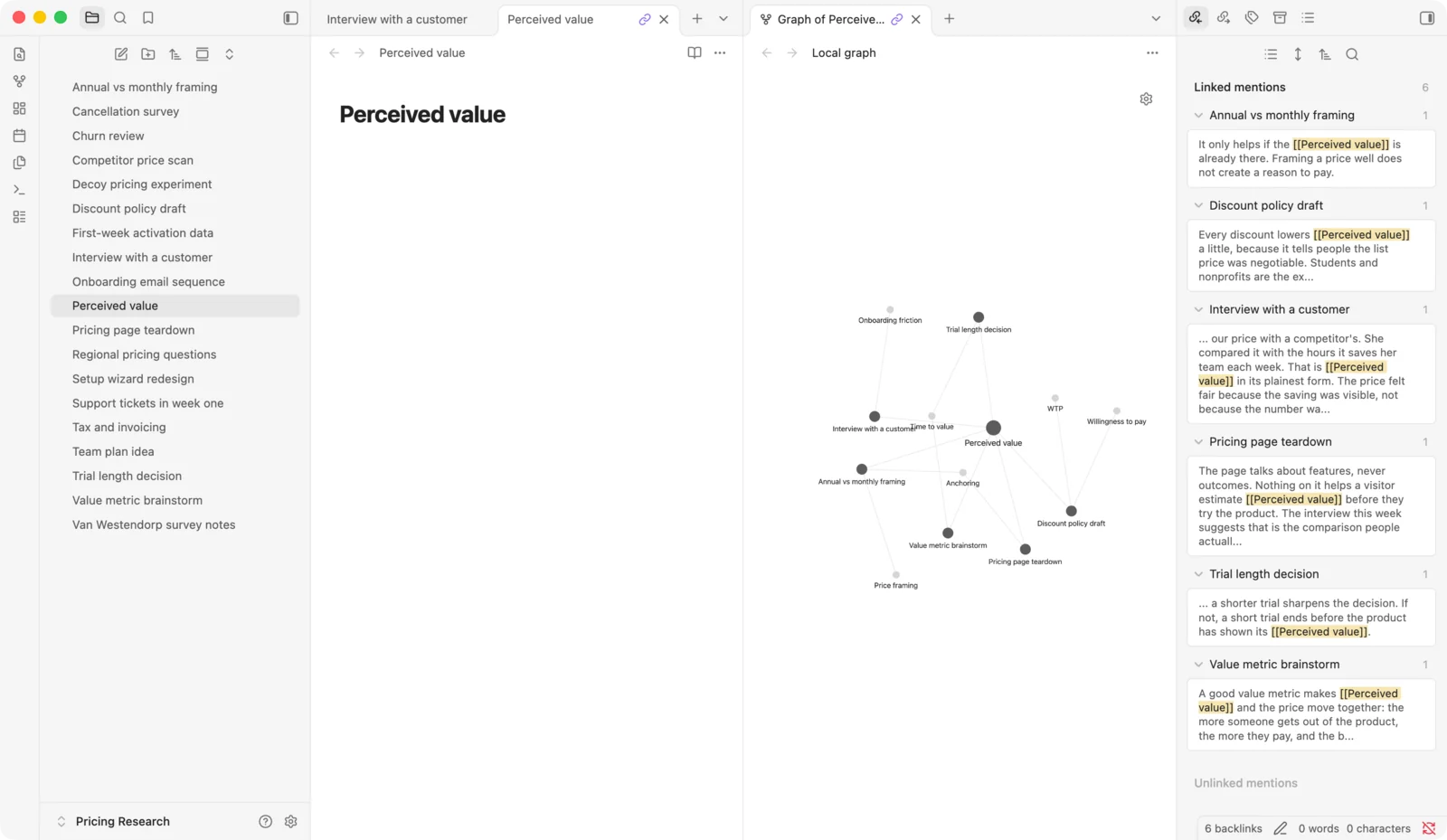
In Obsidian, [[Perceived value]] is a link to a note called Perceived value. If that note does not exist yet, the link is shown "in a more muted color to indicate that the note doesn't exist yet," and clicking it with ⌘ held down creates the note (Link notes). A note in Obsidian is a Markdown file in your vault, so you now have a file called Perceived value.md.
Open that file and look at the Backlinks tab in the right sidebar. It has two sections (Backlinks):
- Linked mentions lists the interview and the teardown, because both link here.
- Unlinked mentions lists the places where the words "perceived value" appear in your notes without a link.
Now open the graph view. "Circles represent notes," and "lines represent internal links between two nodes" (Graph view). Your three notes are circles, and so are Perceived value, Onboarding friction and Anchoring, whether or not you have created those notes yet: "a note doesn't need to exist to link to it," and a filter called Existing files only hides the ones that don't. Perceived value has a line to the interview and a line to the teardown. Onboarding friction has a line to the interview and a line to the churn review.
There is no line between Perceived value and Onboarding friction. In Obsidian a line is a link, and neither of those two notes links to the other. What connects them is that one note, the interview, links to both. A local graph shows that if you set its depth to two, since each level of depth "will show notes connected to the notes revealed at the previous depth." Or you can write the link yourself, from one concept note to the other.
None of this is a shortcoming. It is the model working as designed. Perceived value is a file like every other file, and it becomes a concept note because you decide to use it as one. Obsidian leaves plenty of room for that: a set of notes that each name one idea, each collecting what you think about it. The vault holds that convention because you keep it.
In Jotaid: a concept, with the notes as its evidence
In Jotaid, [[Perceived value]] creates a node, Jotaid's name for a concept. You do not have to create it anywhere first: it "comes into being as you type" (Creating Nodes). It is not a note, and it is not a file. Your three notes stay exactly what they were. The node is a separate object that they all point at.
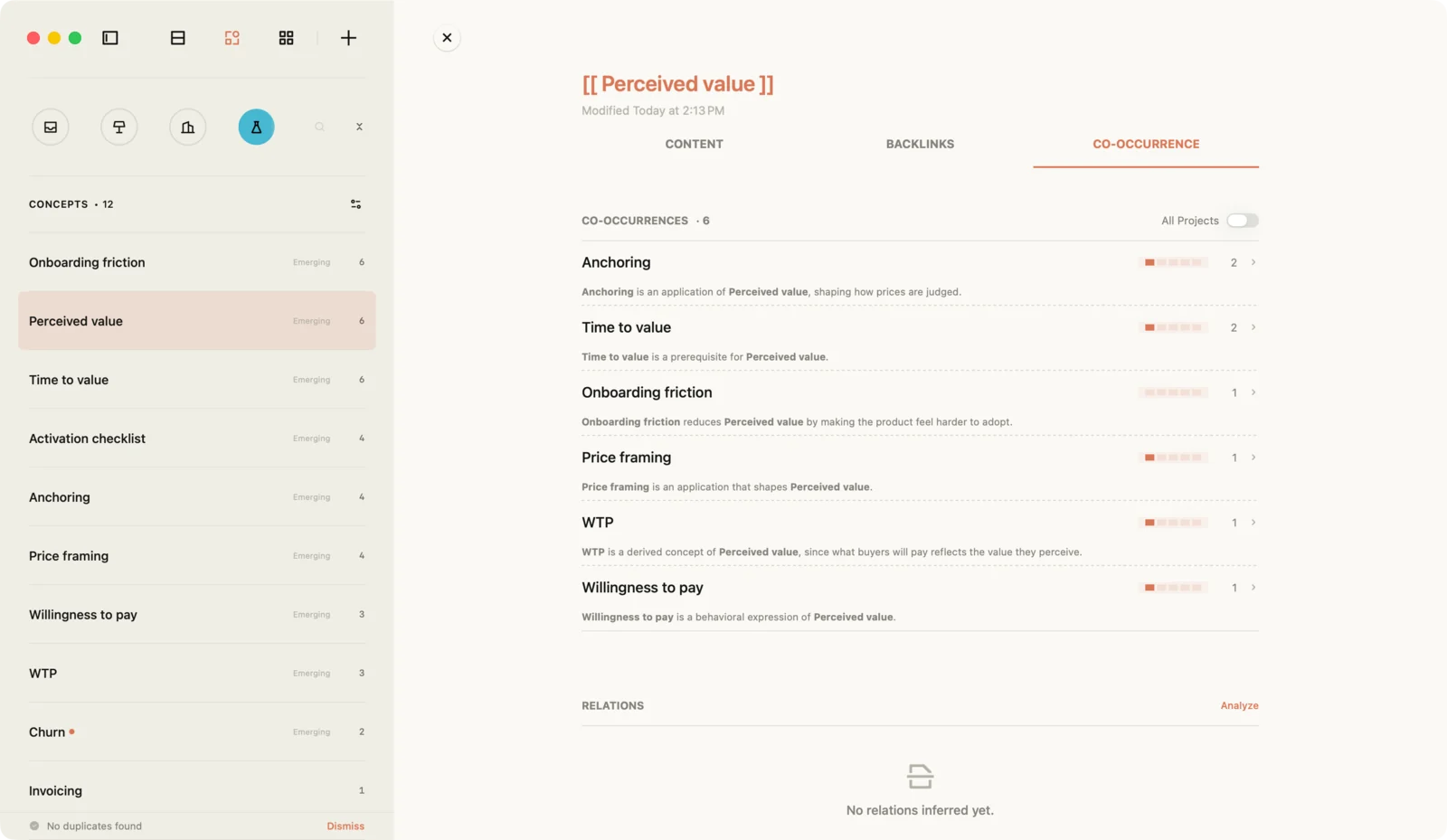
Open Perceived value and its page has three tabs (Backlinks):
- Content is the node's own body, where you write what you currently think the idea means. You edit it like any note.
- Backlinks lists every note that references it: the interview and the teardown.
- Co-occurrence lists the concepts it keeps appearing with, plus predictions and AI suggestions.
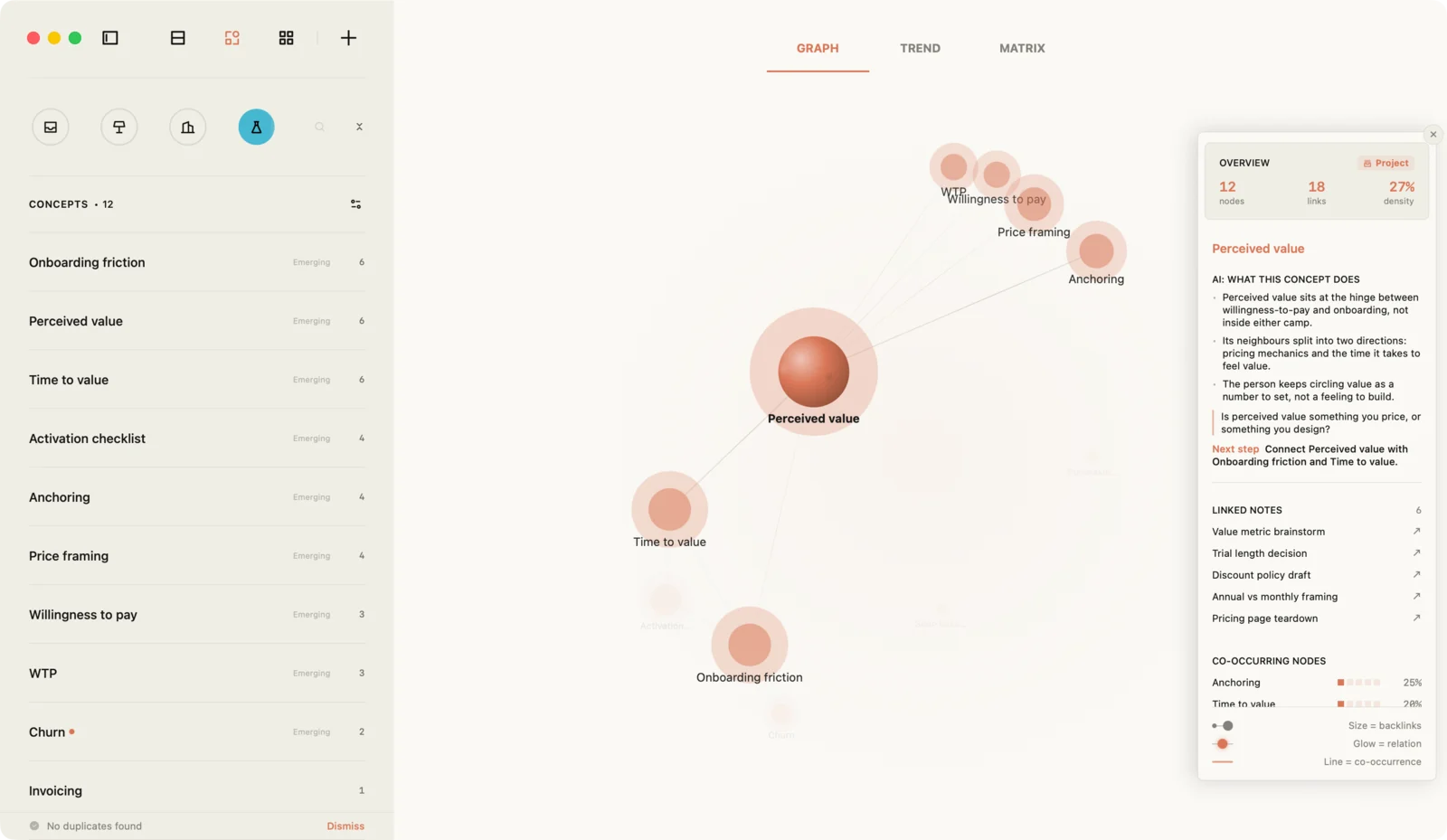
The interview mentions both Perceived value and Onboarding friction, so in Jotaid's terms those two concepts have co-occurred once. That is "a plain fact: two nodes appearing in the same note" (Co-occurrence & Matrix). Jotaid records it without you writing a link between the two concepts. Open the graph and you will find a line between Perceived value and Onboarding friction, because a line in Jotaid's graph means something different: "it means 'A and B have been discussed together'" (Knowledge Graph). Your notes do not appear as circles at all. The graph is made of concepts only.
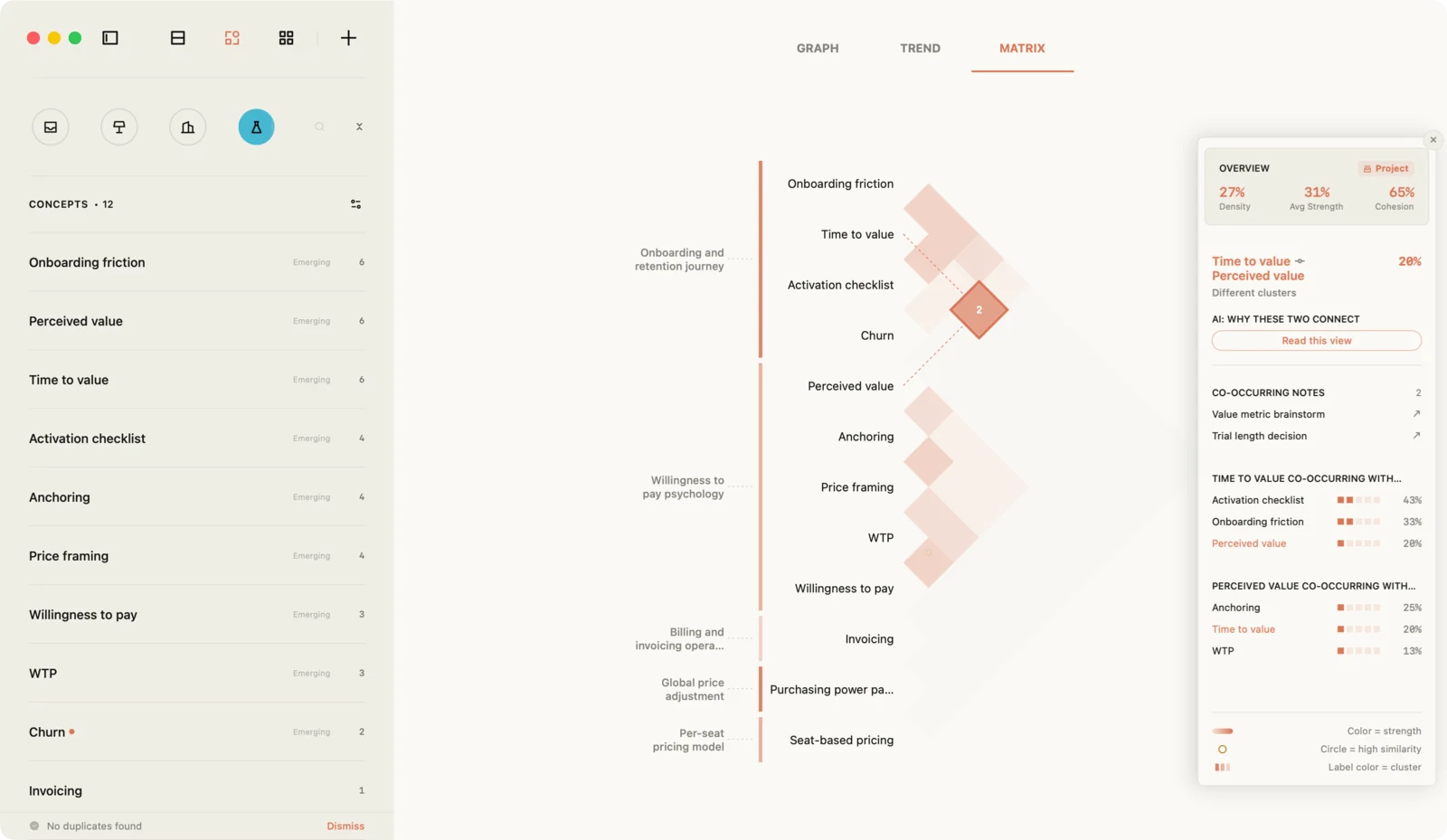
The same pairs also fill a co-occurrence matrix: a grid of the concepts you reference most, one row and one column each, where the cell at each crossing shows how strongly that pair goes together across the whole project. Here, Perceived value meets Onboarding friction in one cell and Anchoring in another, and Onboarding friction never meets Anchoring at all.
Because the concept is a separate object, you can work on it directly. Rename Perceived value and every note that cites it is rewritten to match, much as Obsidian can update links when you rename a file. Find out that two nodes were one idea under two names, and you can merge them, with their references combined (Managing Nodes). Delete a node, and "your notes are untouched — the [[ ]] in them reverts to ordinary text."
Same brackets, different objects
Typing [[Perceived value]] gives you the same few characters in both apps, and two different things.
In Obsidian, you have made a link to a file. The vault's structure is the set of links you have written between files. Whether a file stands for a concept is up to you. So is any direct link between two concepts: it exists once you write it.
In Jotaid, you have pointed a note at a concept. The concept is a different kind of object from the notes. It collects its notes as evidence, and its relationship to every other concept is worked out from the notes they share. What it means is still yours to write, in its Content tab.
Neither model is the more advanced one. They put the work in different places. The next two sections take each model at its best: first Obsidian, then Jotaid.
Obsidian at its best
Obsidian's own front page makes three promises: "Obsidian stores notes privately on your device," "with thousands of plugins and themes, you can shape Obsidian to fit your way of thinking," and "Obsidian uses open file formats, so you're never locked in" (obsidian.md). The help pages show how much is built on those three.
Your notes are files you own. Obsidian "stores your notes as Markdown-formatted plain text files in a vault," and "a vault is a folder on your local file system" (How Obsidian stores data). Because they are plain text, "you can use other text editors and file managers to edit and manage notes," and Obsidian picks up the changes. You choose how they sync: Obsidian's own Sync, or "Dropbox, iCloud, OneDrive, Git, and many other third-party services." Your notes do not depend on the company staying in business, and you never have to export them, because they were never anywhere else.
It runs everywhere, and it is free. There are apps for Mac, Windows, Linux, iPhone and Android (download). The pricing page opens with "Free without limits. No sign-up required," and says you are not required to buy a license even for work. What costs money is optional: "add-on services make it easy to sync and publish your notes" (pricing).
Links are precise. A link can point at a whole note, at a heading inside it, or at a single paragraph or list item, using a block identifier (Internal links). A note can carry aliases, "alternative names" such as acronyms or a term in another language, so that different words reach the same file (Aliases).
Structure is there when you want it. Properties hold "structured data such as text, links, dates, checkboxes, and numbers" at the top of a note (Properties). Bases turns them into "database-like views of your notes," with tables, cards, lists, a kanban board and a map, and "all the data in Obsidian Bases is stored in your local Markdown files and their properties" (Bases).
You can draw a relationship and name it. Canvas is a board with "infinite space to lay out notes and connect them to other notes, attachments, and web pages." Its instructions say: "Draw lines between cards to show relationships. Add colors and labels to describe how they relate" (Canvas). A canvas is saved as a .canvas file in JSON Canvas, an open format, so even the board is a file you own.
It becomes what you need. Community plugins "adapt Obsidian to fit your specific needs" (Community plugins). The same page is frank about the trade: plugins "run third-party code on your behalf," which is why Obsidian keeps them in a restricted mode until you turn them on. And since version 1.12, Obsidian has a command line interface. Its help page puts the scope plainly: "Anything you can do in Obsidian you can do from the command line" (Obsidian CLI).
Put together, Obsidian gives you durable, precise materials and a great deal of freedom in what to build from them. The decisions are yours: which notes stand for concepts, which ones should be linked to each other, and what a link means. Obsidian keeps every decision you make, in a file you can read without it. It does not make those decisions for you, and that is a design choice, not a missing feature.
Jotaid at its best
Jotaid starts at the other end. It takes the links you already write as data, and works out what they add up to across all your notes. The concept pages from the last section are where that starts.
A grid of every pair. The co-occurrence matrix puts the concepts you reference most on both axes, so every pair has a cell. Three patterns are worth looking for (Co-occurrence & Matrix). Bright blocks along the diagonal are clusters, sets of concepts that all go together. A bright cell between two blocks is a bridge, a relationship that joins two lines of thought. And the very strongest cells are flagged High Similarity, because overlap that heavy "usually means one thing": you may have two names for one idea, and the usual fix is to merge them.
Pairs that have not met yet. Link predictions answer a narrower question: which two concepts "have never appeared in the same note, yet look — from the shape of the whole network — like they should be connected?" (Link Predictions). This is not AI. It runs offline, from the links you wrote. A concept you lean on everywhere counts for little, and one you reached from two different directions counts for a lot. Each prediction lists the shared concepts behind it, rarest first, so you can check the reasoning instead of trusting a score.
Where each concept sits. Some concepts carry a badge that Jotaid reads off the network (Node Types). Core is heavily cited, with neighbors that are tied to each other too. Bridge is cited alongside concepts that "otherwise have nothing to do with each other." Emerging is what you have been citing a lot recently. Bridge is the one to chase, because it may be the only thing connecting two topics you have never thought about together.
When each concept was active. The Trend view adds time: it shows "when a concept first appeared, when it grew, and when it went quiet," with a small chart of each concept's references over time (release notes).
Notes related by meaning. An index of what your notes mean runs on your device by default, "using Apple's built-in model: no network, no cost, and your note text never leaves the machine" (Semantic Relations). It finds related notes even when they share no words, and labels each one with where it came from: a note that shares concepts with this one (a fact you built), a note similar in meaning (the model's judgment), or a near-duplicate.
A place to write what it adds up to. A theme gathers related notes into one direction. It "is itself a note," with a body for the overview, your conclusions and the open questions, and on the Theme view's canvas it appears as a labeled border around its cards (Themes). The same notes can be read three ways: Note view to write, Node view to analyze, Theme view to arrange (Interface Views).
AI, if you want it. With Pro and an API key from a provider you choose, AI can propose concepts across a project, group notes into themes, summarize a theme into its theme note, and suggest what kind of relationship two concepts have (Free vs Pro). Proposed concepts and themes arrive unticked, and only what you tick is created. The guide draws the line in one sentence: "analysis of a network you built by hand is free; having the AI build it for you is Pro." Everything in this section above this paragraph is free.
So Jotaid makes a different trade. It gives you one system rather than materials, keeps your notes in its own database rather than in files, and is built only for the Mac and the iPhone. In exchange, the structure across your notes is something the app works out and shows you, not something you build and maintain. What it cannot do is decide which ideas are concepts, or what a relationship means. You still type the brackets. And when two concepts turn out to go together, Jotaid shows you that they do. Saying why is your job.
Five questions that separate them
Feature lists make these two apps look closer than they are. Both have backlinks, a graph, a canvas, Markdown and a way to find the mentions you never linked. The differences that change your work show up as answers to five questions.
1. What does a link point at?
In Obsidian, a link points at a file, and every file is the same kind of thing. A note about an interview and a note that names an idea are both Markdown files in the vault. That uniformity is what keeps the vault simple and portable: there is nothing in it but files and the links between them.
In Jotaid, a link points at a concept, and a concept is a different kind of thing from a note. That separation is what lets the app treat your concepts as a set: count them, rank them, set every pair side by side in one grid. It also means there are two kinds of object to learn, where Obsidian has one.
Ask yourself: when you look back over your notes, do you look for documents or for ideas?
2. Who works out how two concepts relate?
In Obsidian, you do. Two concepts are linked when you link them, in a note or on a canvas. The app gives you good tools for finding candidates, such as unlinked mentions and a local graph you can open to a chosen depth. Deciding that two ideas belong together, and recording it, is your step.
In Jotaid, the app works out the first part. Any two concepts that appear in the same note have co-occurred, and the matrix shows every such pair among the concepts you reference most, including pairs you never connected to each other. Link predictions go one step further, to pairs that have never shared a note but sit close together in your network. Both come from the links you wrote, with no AI involved. And a pair's panel lists notes the two concepts share, so you can read the sentences behind a cell instead of taking its color on trust.
Counting cannot tell you why. Two concepts can share a note because one explains the other, because they contradict each other, or because you mentioned them in the same breath for no reason. Co-occurrence tells you where to look, not what you will find there. With Pro, AI can propose what kind of relationship a pair has, which the next question covers, but that is a proposal for you to judge, not a finding.
Ask yourself: are you short of ways to record connections, or short of ways to notice them?
3. Where does your judgment live?
In Obsidian, wherever you put it: in a note, in a property, in the label on a canvas line. Canvas is the one place where a relationship between two notes can carry a name of its own. It is all stored in files you can read without the app.
In Jotaid, most of your judgment lives in writing. A concept's Content tab holds what you think the idea means. A theme note holds what a group of notes adds up to: the conclusions, the open questions.
For the relationship between two concepts there is also a structured layer, and it works the other way round from a canvas label. With Pro, AI proposes a type for a relationship, such as application, hierarchy, contrast or dependency, along with the note fragment it read it from. Your part is to reject the ones you disagree with, and a rejected relation stays rejected when the analysis runs again (release notes). What you cannot do is write a type yourself, the way you would label a line on a canvas.
So a relationship you work out on your own goes into writing, in a concept's body or in a theme note. If that note names both concepts, it becomes one of the notes they share, and the next time you open the pair, your conclusion is among the evidence.
Ask yourself: when you work out how two ideas relate, where do you want to find that conclusion a month later?
4. What do you own, and in what form?
In Obsidian, you own a folder of Markdown files. There is nothing to export, because the files are the notes. Any editor, sync service or backup tool works with them, and they stay readable without the app.
In Jotaid, notes live in the app's own database on each device and sync through your own iCloud account. There is no folder another editor can open while you work. What you own is the ability to take everything out. Notes export as Markdown with YAML front matter and their images. On the Mac, a project exports at once, as a folder with a subfolder for each theme. An encrypted backup copies everything, attachments included (Import & Export, Backup & Restore).
These are two different kinds of ownership. With files, you own the notes continuously. With an export, you own the way out. If continuous ownership is the property you care most about, Obsidian answers that directly, and no export from Jotaid is the same thing.
Ask yourself: do you need other tools to work on your notes every day, or only to be able to leave?
5. Where does it run, and what does it cost?
Obsidian runs on the Mac, Windows, Linux, iPhone and Android, and the app is free, including for work. What you can pay for is optional: Obsidian's own Sync and Publish services, and a commercial license that organizations are encouraged but not required to buy (pricing).
Jotaid runs on the Mac and the iPhone, as native apps, and syncs between them through iCloud. It is free to download, and the free tier is not a trial: one project, the Inbox, with everything inside it, including the editor, backlinks, the graph, the matrix, link predictions, the canvas, iCloud sync and the on-device semantic index. Pro adds more projects, the AI features, moving notes in bulk, filtering by several conditions at once, and on the Mac a read-only connection for AI agents. It comes as a monthly or yearly subscription or a one-time purchase, all unlocking the same features. AI runs on an API key you get from a provider you choose, and you pay that provider directly (Free vs Pro).
Ask yourself: which devices do your notes have to be on, and which of your projects need more than one space?
The five answers side by side
| Obsidian | Jotaid | |
|---|---|---|
| A link points at | A file | A concept |
| Relationships between concepts | Written by you | Worked out from your notes, interpreted by you |
| Your judgment lives in | Notes, properties, canvas labels | Concept pages and theme notes; rejecting AI-proposed relation types (Pro) |
| What you own | The files themselves | Your notes, through Markdown export and encrypted backup |
| Platforms and price | Five platforms; free, with optional paid services | Mac and iPhone; free for one project, Pro for more and for AI |
Neither column wins every row, and the right answer depends on the work. The next section is for readers whose answer is "both".
Using both
You do not have to choose one app for everything. The two models suit different stages of the same work: Obsidian for keeping everything, Jotaid for developing one part of it. Here is a way to try that without risking your vault.
1. Pick one body of work. Not the whole vault. One research question, one project, one subject you keep coming back to and have not yet made sense of. A folder of a few dozen notes is enough for patterns to show up.
2. Bring in a copy. On the Mac, Import Folder reads a folder of Markdown and maps it onto Jotaid's structure: the folder becomes a project, each top-level subfolder a theme, and anything deeper folds into tags. On the free tier there is no new project, so the folder goes into the Inbox, with the same mapping one level down. Front matter is read, so your original timestamps survive, and images come along. Other embeds, such as PDFs, are not imported; their text stays in the note (Import & Export). Your vault stays exactly where it was.
3. Let your links become concepts. The [[links]] in your notes are recognized, and each linked name becomes a concept. That means the links you already wrote in Obsidian are the starting material: there is nothing to rebuild. On any concept's row, Link All then finds the places where its name appears as plain text, across every note, and turns them into links in one step (Managing Nodes). Open a few notes that use heading links or aliases and check that they came in the way you expect.
4. Work the way Jotaid is built for. Read the matrix for clusters and bridges. Check the High Similarity cells for concepts you have been writing under two names, and merge them. Look at the predictions. When something becomes clear, write it down: in the concept's own page, or in a theme note that gathers the notes it came from.
5. Bring the results back. Export the notes, or on the Mac the whole project, as Markdown. Each note comes out as a .md file with YAML front matter and its images, and the body is the text you wrote, so your [[links]] are still in it. Put back into the vault, they point at notes with those names, the way they did before. One thing does not come back this way: a concept's own page is not part of the export. Anything you want to keep in the vault, such as a definition you wrote in Jotaid or a conclusion about how two ideas relate, belongs in a note, and a theme note is the natural place for it.
One rule makes this work: for any body of work, decide which app is the one you edit. The two apps do not sync with each other. Editing the same notes in both is how you end up with two versions and no record of which is right. A clean split is easy to keep: the vault holds the archive, and the one project you are developing lives in Jotaid until you bring it back.
Notes for your AI agents
Both apps can give an AI agent your notes, in different ways. An Obsidian vault is a folder of files, so any tool that can read files can read your notes, and Obsidian's command line interface lets scripts and tools work with the app itself (Obsidian CLI).
Jotaid's notes are in a database, so an agent reaches them through a server. On the Mac, with Pro, Jotaid can serve your notes to agents running on the same Mac over MCP, the protocol many agents use to connect to outside tools. It is read-only and off by default, you choose which projects it can read, and it runs only while Jotaid is open. What an agent gets is more than the text: it can look up a concept, see which notes mention it, see which concepts keep appearing together, and see when a concept was active (Connect AI Agents). If what you want from an agent is "tell me what these notes add up to," the network is the useful part.
Which one is right for you
Stay with Obsidian, and only Obsidian, if you need Windows, Linux or Android; if other tools need to work on your notes as files every day; or if building your own system out of plugins is part of what you enjoy. That last one is not a flaw to be fixed. A vault you shaped yourself fits you better than any system someone else designed.
Choose Jotaid if the Mac and the iPhone are where you work, your notes come from many sources about the same few questions, and what you are missing is not a place to store notes but a way to see what they add up to. It suits work where an idea has to be developed across many notes: research, writing, strategy, design. It also asks something of you. Concepts do not appear on their own: you name them, by typing [[ ]] or by approving what AI proposes. If you do not want to name things, the graph and the matrix have nothing to work with.
Use both if everything already lives in your vault, and one body of work in it deserves more than storage. Keep the vault. Bring that one project into Jotaid, develop it, and bring the conclusions back.
Look elsewhere if you need to work with other people in the same notes. Jotaid has no shared workspaces or comments. Obsidian supports a shared vault through its Sync service, which every collaborator needs a subscription for (Collaborate on a shared vault). If shared editing is the center of your work, a tool built for teams may suit you better than either.
Back to one link
Go back to the three notes from the start. In both apps you typed [[Perceived value]] twice and [[Onboarding friction]] twice, and the keystrokes were identical.
In Obsidian, Perceived value is a file waiting for you to decide what it is. It holds whatever you write in it, it links to whatever you link it to, and it will still be a readable file long after you have stopped thinking about pricing. In Jotaid, Perceived value is a concept that is already collecting its evidence, and it already sits next to Onboarding friction, because one interview mentioned both.
Neither app can tell you why those two ideas belong together. That sentence is yours to write. The choice is about what surrounds you when you write it: a vault that keeps every decision exactly where you put it, or a system that keeps showing you the pairs you have not decided about yet. If you want the first, stay with Obsidian. If you want the second, try Jotaid with one folder of your vault. The vault will be where you left it.
Frequently asked questions
Is Jotaid an Obsidian plugin?
No. Jotaid is a separate, native app for the Mac and the iPhone, with its own editor and its own storage. The two work alongside each other through Markdown: Jotaid imports a folder of Markdown files on the Mac, and exports notes back out as Markdown.
Can I import my Obsidian vault into Jotaid?
Yes, on the Mac. Import Folder takes a folder of Markdown files, such as a vault or one folder inside it. The folder becomes a project, its top-level subfolders become themes, and anything deeper becomes tags. On the free tier the folder goes into the Inbox instead of a new project. Front matter is read so the original timestamps are kept, images come along, and the [[links]] in your notes become concepts. Other embeds, such as PDFs, are not imported. Your vault is not changed.
Does Jotaid store notes as Markdown files?
No. Notes live in Jotaid's own database on each device and sync through your iCloud account, so there is no folder of files that another editor can open while you work. Notes export as Markdown with YAML front matter and their images, and an encrypted backup copies everything, attachments included.
Can I move back to Obsidian after trying Jotaid?
Yes. Export the notes, or on the Mac a whole project, as Markdown, and put the files into your vault. The text you wrote comes back as it was, so your [[links]] still point at notes with those names. A concept's own page is not part of the export, so write anything you want to keep, such as a definition or a conclusion, into a note before you export.
Is Jotaid free, like Obsidian?
Both have a free version you can use for real work. Obsidian is free, with optional paid services for sync and publishing. Jotaid is free for one project, the Inbox, with every feature inside it, including the graph, the co-occurrence matrix, link predictions and iCloud sync. Jotaid Pro adds more projects, the AI features, moving notes in bulk, filtering by several conditions at once, and an agent connection on the Mac, as a subscription or a one-time purchase.
Does Jotaid run on Windows, Android or the web?
No. Jotaid is built for the Mac and the iPhone only, and there is no Windows, Android or web version. If you need your notes on Windows, Linux or Android, Obsidian has apps for all three.
Can AI agents read my notes in both apps?
Yes, in different ways. An Obsidian vault is a folder of files, so any agent that can read files can read it, and Obsidian has a command line interface for working with the app. Jotaid can serve your notes to AI agents on the same Mac over MCP, with Pro. That connection is read-only and off by default, you choose which projects it covers, and it gives an agent the concept network as well as the text.