
Appearance
How to Write a Literature Review from Your Notes: The Concept Matrix Method
Forty papers, forty summaries
Suppose you have spent two months on the literature for a thesis chapter or a report. You have read about forty papers, and you have been disciplined about it: every paper has a note, with its question, its method, its findings, a few quotations and your reaction. The notes are good. You sit down to write the review.
The first draft comes out like this:
Author A (2019) studied trust in remote teams and found that frequent check-ins helped. Author B (2020) surveyed managers and argued that check-ins signal a lack of trust. Author C (2021) looked at onboarding and found that new hires in remote teams took longer to feel trusted…
Paragraph after paragraph, one paper at a time. Each sentence is accurate. Together they read like an annotated bibliography with the bullet points removed. The comment that comes back on drafts like this is usually some version of: this summarizes the papers, but what does the literature say?
You know what they mean. The interesting part is in the middle of that paragraph. Author A and Author B looked at the same practice and came to opposite conclusions, and Author C may explain why. But the draft does not say so, because each paper only ever appears next to itself.
Your review is organized the way your notes are
This kind of draft is not a writing problem. It is an organization problem, and it starts long before you write.
Your notes are organized by source. One note per paper is the natural way to read: you finish a paper, you write down what it said, you move on. Reference managers are built around the source too, and for good reason. The source is the unit you read, cite and look up again.
But the source is not the unit you write about. A literature review is about questions, ideas and disagreements, and those run across papers. "Check-ins" turns up in eleven of your forty notes. "Psychological safety" turns up in seven. Three papers measure "trust" in ways that are not quite the same thing. None of that is visible when your notes are a stack of forty separate summaries, so when you write from the stack, the review comes out as a stack too.
The fix is not to write harder. It is to reorganize what you know, from what each paper said to what has been said about each idea, before you start drafting. That is easy to agree with and hard to do across forty papers on a deadline, without a method. The rest of this article describes one, first in the form its authors gave it, then as something you can run on your own notes.
The method has been around for more than twenty years, and its core fits on a single page. It comes from a short editorial by two journal editors who had found that many authors in their field were not familiar with how a review is supposed to be structured.
The concept matrix, as its authors described it
In 2002 Jane Webster and Richard T. Watson published a guest editorial in MIS Quarterly called "Analyzing the Past to Prepare for the Future: Writing a Literature Review" (doi:10.2307/4132319). They wrote it as the first senior editors of the journal's review series, after finding, in their words, that "many IS scholars are not familiar with the structure and format of reviews." It is written for that review series, though a footnote adds that much of it "has general value for most IS literature reviews," and its examples come from information systems and neighboring fields. This section reports what it says. My reading of it comes at the end.
The problem it addresses
Early on, the editorial quotes D. J. Bem, from a 1995 article on writing reviews for Psychological Bulletin: "Authors of literature reviews are at risk for producing mind-numbing lists of citations and findings that resemble a phone book." Bem's alternative, as quoted there: "a coherent review emerges only from a coherent conceptual structuring of the topic itself. For most reviews, this requires a guiding theory, a set of competing models, or a point of view about the phenomenon under discussion."
Concept-centric, not author-centric
The core of the method is one distinction. "A literature review is concept-centric. Thus, concepts determine the organizing framework of a review. In contrast, some authors take an author-centric approach and essentially present a summary of the relevant articles. This method fails to synthesize the literature."
The editorial illustrates the difference with a small table. In a concept-centric review, each concept is followed by the authors who address it: concept X, then authors A and B; concept Y, then authors A and C. In an author-centric review, each author is followed by the concepts they cover. The same information, read in the opposite direction.
The matrix
To get from one to the other, the authors recommend a specific tool: "To make the transition from author- to concept-centric, we recommend that you compile a concept matrix as you read each article." The idea, they say, is adapted from Salipante and colleagues (1982), whose paper was titled "A Matrix Approach to Literature Reviews." In the editorial's example table, the rows are articles, the columns are concepts, and marks fill the cells where an article meets a concept.
The next step comes after the reading: "When your reading is complete, synthesize the literature by discussing each identified concept." Before starting, they suggest you "take some time to develop a logical approach to grouping and presenting the key concepts you have uncovered."
They also describe an extension. The matrix may need "a further dimension" for the unit of analysis, such as organizational, group or individual. Their example is a concept that "had different meanings" at different levels, and they argue that "isolating concepts by unit of analysis should result in a crisper review because it is easier to detect when you let a concept stray outside the scope of its domain."
When to stop reading
The editorial recommends a structured search: start with the leading journals, then "go backward" through the references of the articles you found, then "go forward" to articles that cite them. On when the search is done, it gives a simple test: "You can gauge that your review is nearing completion when you are not finding new concepts in your article set."
What the review is for
Two more points from the editorial matter here. On tables: they "cannot be merely lists of articles," and should categorize the literature "based on a scheme that helps to define the topic area, such as types of variables examined, level of analysis, gaps in the literature, or other important theoretical issues." On purpose: "A review should identify critical knowledge gaps and thus motivate researchers to close this breach." The authors call extending or developing theory "often the weakest part of a review," and add: "Nonetheless, it is the most important part of a review and generally needs the most elaboration." They describe doing this mainly through "a conceptual model with supporting propositions."
What I take from it
That is what the editorial says. What follows is my reading, applied to notes.
The method's unit is the concept, but its raw material is still the article. You read one source at a time, as you always would. What changes is what you record while reading: not only what the paper says, but which concepts it touches. The matrix is built as a side effect of reading, and that is why it works. Nobody has to reorganize forty summaries at the end.
The "no new concepts" test is the most practical idea in the editorial, and the easiest to lose. It only works if you can see, at any point, which concepts you have collected and when each one first turned up.
The unit-of-analysis extension is a warning that applies far beyond organizations and teams: the same word can name different things in different papers, and the review gets sharper when you notice.
And one step goes beyond what the editorial says. The authors look for gaps by building a conceptual model. A matrix also has a simpler way of pointing at them: the cells that stay empty. If two concepts are each studied often but never in the same paper, that is not proof of a gap, since there may be a good reason nobody connected them. But it is a pair worth asking about, and the matrix shows it to you for free.
The next section looks at how this goes when you do it by hand, and where it starts to strain.
Doing it by hand, and where it strains
The classic way to build a concept matrix is a spreadsheet. One row per paper, one column per concept, a mark where they meet. It works, and for a short review it may be all you need. It is explicit, it is portable, it costs nothing, and it forces you to name your concepts, which is half the value. If your review covers fifteen papers, stop here and open a spreadsheet.
At forty papers or more, a few things start to strain.
The columns drift. You start with a column called trust. Ten papers later you add interpersonal trust, then swift trust, then realize that two of them are the same idea and one is not. Merging columns means going back through every row. Renaming one means remembering which notes used the old word.
The marks are not the evidence. A cell says that paper 17 deals with check-ins. When you write the paragraph about check-ins, you need what paper 17 actually said, so you go back to the paper, or to your note on it. The matrix tells you where to look. It does not hold what you will find.
You never see the pairs. The matrix answers "which papers discuss check-ins?" The question a review is built on is a different one: which concepts are studied together, and which never meet? Answering that from a paper-by-concept grid takes another round of counting by hand.
You lose the order. The "no new concepts" test needs to know when each column was added. A spreadsheet does not remember, unless you kept a date column from the start.
None of this makes the spreadsheet wrong. It means the bookkeeping grows faster than the review, and bookkeeping is the easiest part to let slide when the deadline gets close.
Running the method on your notes in Jotaid
What follows is the same method, run in Jotaid, the app I build. The aim is not to replace the method with an app. It is to let the matrix build itself out of the notes you were going to write anyway, so the bookkeeping does not compete with the reading.
1. One note per source
Keep the habit you already have: one note per paper, written while or just after you read it. The question, the method, what it found, the passages you might quote, and what you think.
Jotaid does not open or annotate PDFs, so if you read and highlight in another tool, bring the notes in as Markdown. When Zotero's team announced Markdown export of Zotero notes, in December 2021, they described it as a way to "annotate PDFs, add those annotations to Zotero notes, and then export those notes to a Markdown-based tool" (Zotero Forums). Readwise can likewise "export a single document as Markdown" (Readwise docs). Jotaid imports single Markdown files, or, on the Mac, a whole folder at once, with each top-level subfolder becoming a theme. It reads the dates in a file's front matter, so an imported note keeps the dates recorded there (Import & Export).
Keep your reference manager. The source notes in Jotaid are for thinking; citations and the bibliography stay where they are.
2. Mark concepts as you read
This is the step that builds the matrix. Whenever a note touches an idea the review will need to discuss, wrap it in double brackets: [[check-ins]], [[psychological safety]], [[swift trust]]. You can also select a word in an existing note and mark it as a concept. In Jotaid, each of these becomes a node, a concept with a page of its own (Creating Nodes).
That page holds two things the spreadsheet could not. Its Backlinks tab lists every source note that mentions the concept: that is the concept's column in Webster and Watson's matrix, made of your notes instead of marks. Its Content tab is a body you write yourself, which becomes the place for your working definition of the concept, and later for what the literature says about it. The node list shows how many notes mention each concept, so the most-discussed ideas rise to the top.
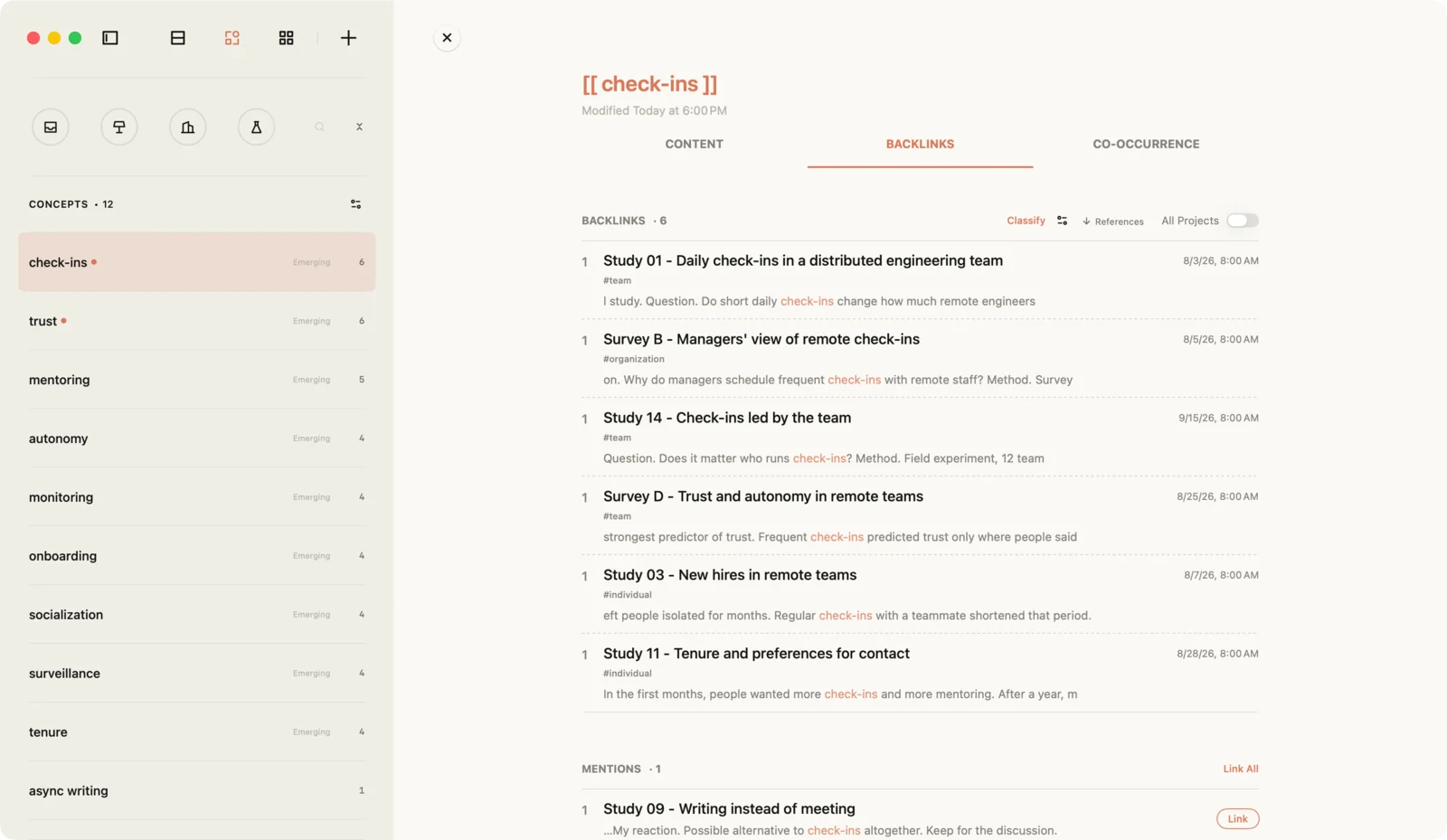
You will not bracket every mention. Jotaid finds the places where a concept's name appears as plain text, and on any concept's row, Link All turns those mentions into links across every note (Managing Nodes).
3. Keep the names honest
The drifting-columns problem becomes a renaming problem, and renaming is cheap. Rename a concept and every note that cites it is rewritten to match. If you rename one concept to the name of another, Jotaid recognizes the collision and offers to merge the two, combining their references.
To spot candidates, look at the co-occurrence matrix, described in the next section. A pair that turns up together in almost every note that mentions either is flagged as High Similarity, because overlap that heavy usually means two names for one idea (Co-occurrence & Matrix). With Pro, an AI check can also suggest pairs of concepts that may be duplicates.
Merging is not always right. Webster and Watson's point about units of analysis cuts the other way too: two papers can use the same word for different things. If trust means one thing at the team level and another for individuals, keep them apart under two names, and say so in each concept's Content.
4. Watch for the last new concept
The editorial's stopping rule needs to know when each concept first appeared. Jotaid's Trend view plots, for every concept, how often it was mentioned over time, using the dates of the notes that mention it, so you can see when each concept first turned up and when it went quiet (release notes).
Read for a few more weeks. If the recent stretch of notes keeps adding references to concepts you already have, and no new ones, you are approaching the point the editorial describes: you are "not finding new concepts in your article set." It is a signal, not a proof. A new database search can still turn up a strand you missed. But it is a signal you can now see, instead of one you have to remember.
5. Read the matrix of pairs
Webster and Watson's matrix sets articles against concepts. Once your concepts are marked, Jotaid can show a second matrix that the spreadsheet never gave you: concepts against concepts. Every pair among the concepts you reference most gets a cell, and a cell's shade shows how strongly the two go together across your sources (Co-occurrence & Matrix). Nothing in it uses AI. It counts which concepts appear in the same notes.
For a review, three things in it are worth reading.
Blocks along the diagonal are clusters: concepts that keep appearing together. A cluster is a strong candidate for a section of the review, since those are ideas your sources already tend to discuss together.
A bright cell between two blocks is a bridge: a pair that joins two otherwise separate groups of ideas. Bridges deserve a close look, because they connect strands of work that your sources otherwise keep apart.
Empty cells between busy concepts are the pairs that never meet. Jotaid's link predictions go one step further and point out pairs that have never shared a note but sit close together in the network (Link Predictions). These are the cells to ask questions about. Sometimes the answer is that the two ideas have nothing to do with each other. Sometimes it is the gap your review should name.
Select a cell, and its panel lists the notes the two concepts share. Those notes are the evidence for whatever you write about how the literature relates the two ideas.
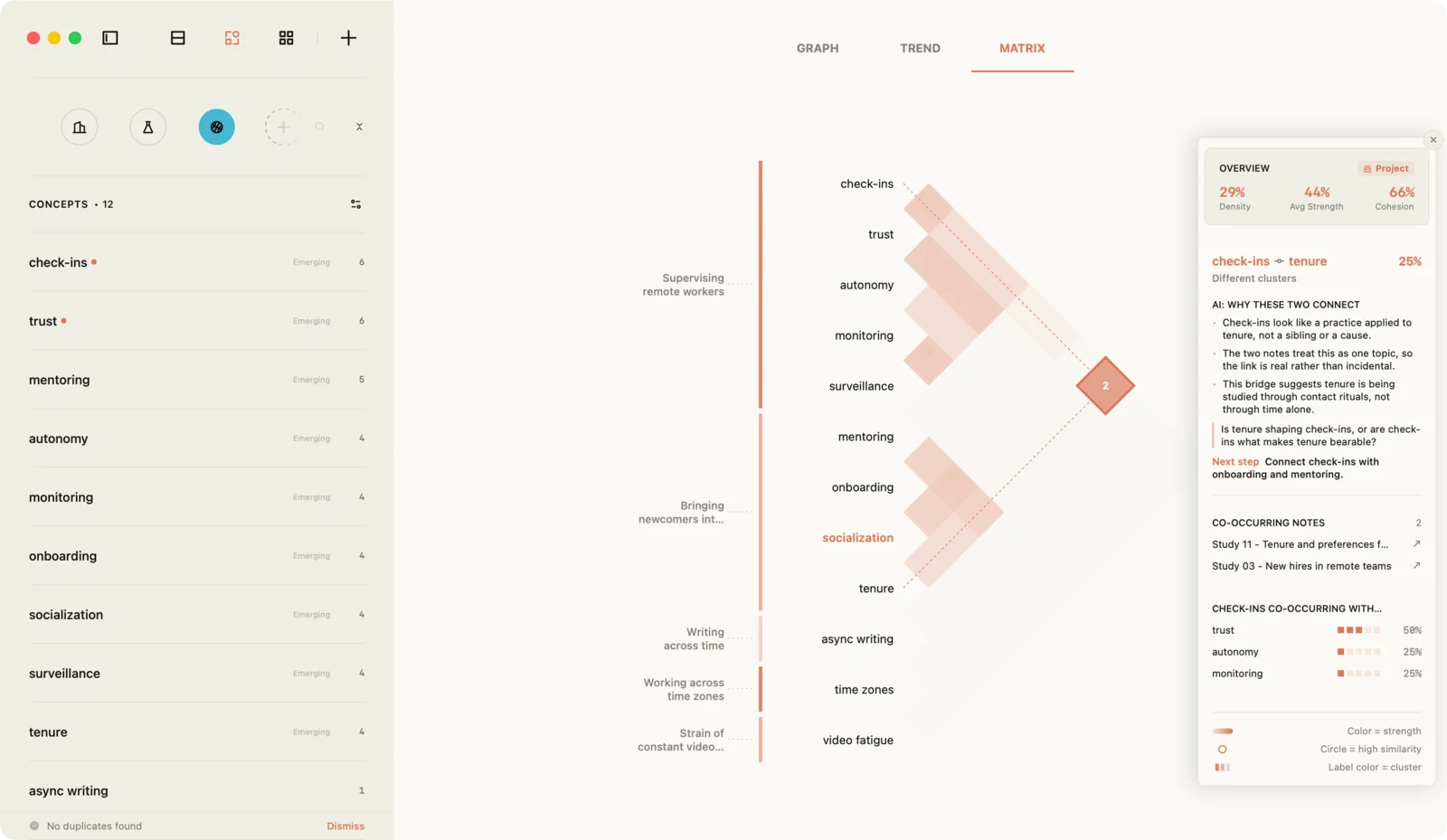
One caution. Two concepts appearing in the same note says nothing about how that source relates them. A paper can mention check-ins and trust to argue that one builds the other, or that one undermines it. The matrix tells you which notes to reread. The rereading tells you what they say.
6. Track the unit of analysis with tags
For the extension Webster and Watson describe, the unit of analysis, tags are the simplest tool. Tag each source note with its level, such as team, individual or organization. The tags then show up in two useful places.
On a concept's Backlinks tab, each source is listed with its tags and a line of its text, so you can see at a glance at which levels the concept has been studied. And in Node view, filtering the concept list by a tag keeps only the concepts that appear in sources at that level: filter by team, and you see what the team-level literature talks about.
If the same concept turns out to mean different things at different levels, that is the moment to split it into two concepts with two names, as in step 3.
7. Write the synthesis by concept
Now comes the step the editorial puts at the center: "synthesize the literature by discussing each identified concept." Do it in two places.
On each concept's page, use the Content tab for a short account of what the literature says about that concept: where sources agree, where they disagree, and which ones you would cite for each point. Work from the Backlinks list, which already holds every source that discusses it.
In themes, build the structure of the review itself. Following the editorial's advice to "develop a logical approach to grouping and presenting the key concepts," create a theme for each section, usually one per cluster from step 5. A theme in Jotaid is itself a note, with a body for your writing, and it gathers related notes around it (Themes). Draft the section in the theme note, and name the section's concepts in it with [[ ]]. Move into each theme the source notes that belong mainly to that section. A note sits in one theme at a time, so place each cross-cutting source where it matters most. It stays reachable from the other sections through its concepts.
When the sections are drafted, export the project as Markdown. On the Mac, a project exports as a folder, with a subfolder for each theme, and a theme note with text in it is written out as a Markdown file of its own (Import & Export). Open the drafts in whatever you write the final document in.
One detail affects where you draft. The concept pages are where you think, but a concept's own page is not included in the export. Anything you want to carry into the final document should end up in a theme note or a regular note.
8. Use AI for noticing, if at all
All of the above works without AI. With Pro and an API key from a provider you choose, a few features can help with the noticing. Smart Node reads a project and proposes concepts worth marking, each with the notes that mention it, and creates only the ones you tick (Creating Nodes). That is useful early, when you are still deciding what your columns are. The AI reading of a matrix cell can suggest what links two concepts, and asks a question back.
Theme Summary can read every note in a theme and write a summary into the theme note, marked as an AI draft until you remove the marker. For a literature review, treat that draft as raw material at most. The synthesis is the part of the review that has to be yours: it is where you say what the literature adds up to. A separate article makes the case for keeping AI on the noticing side of that line.
What this doesn't do
It does not read your papers. Jotaid does not open or annotate PDFs. The reading, and the highlighting, happen in whatever tool you use for that, and the notes come in as Markdown.
It does not manage references. There is no citation database, no bibliography, no citation styles. Keep your reference manager, and cite sources in your notes by whatever key you use there.
It is not a formal review protocol. If your review has to follow a registered search and screening procedure, this method helps with the part after screening: organizing what the included papers say and writing the synthesis. It does not replace the procedure.
Counting is not reading. The matrix shows which concepts share notes, not whether the sources agree. Every claim in the review still comes from rereading the notes behind a cell.
It only knows the concepts you marked. If a note never names an idea, that idea is missing from every list and every cell. The method depends on the habit in step 2.
Some of it needs Pro, or a Mac. The free tier is one project, the Inbox, with every analysis feature inside it. A separate project for the review, and the AI features, need Pro. Importing a whole folder and exporting a whole project are on the Mac.
Concept pages stay behind on export. As step 7 says, anything you want in the final document belongs in a theme note or a regular note.
The paragraph, rewritten
Go back to the draft from the start of this article: Author A on check-ins, then Author B on check-ins, then Author C on onboarding, each in its own paragraph.
Run the method on the same notes, and the concept page for check-ins lists all three sources. The matrix shows check-ins sharing notes with both trust and onboarding. Rereading those notes, you find the pattern the author-by-author draft buried. A paragraph written from that page might begin like this:
Frequent check-ins are associated with both higher and lower trust in remote teams (Author A, 2019; Author B, 2020). The difference may depend on tenure: in Author C's (2021) study of onboarding, new hires read the same check-ins as support that longer-serving staff read as surveillance…
The sources are the same. The sentences are organized around the idea, and the disagreement, which was always in your notes, is now the point of the paragraph. That is the difference Webster and Watson draw between the two kinds of review. In the concept-centric one, "concepts determine the organizing framework," and the papers appear as the evidence for each concept.
Frequently asked questions
What is a concept matrix in a literature review?
A table with articles as rows and concepts as columns, filled in as you read, so you can see which articles discuss which concepts. Webster and Watson recommended it in a 2002 MIS Quarterly editorial as the way to move from an author-centric review, which summarizes papers one at a time, to a concept-centric one, which discusses each concept across papers.
How do I know when I have read enough?
Webster and Watson put it this way: "You can gauge that your review is nearing completion when you are not finding new concepts in your article set." In Jotaid, the Trend view shows when each concept first appeared in your notes, which makes that test visible.
Can I bring my Zotero or Readwise notes into Jotaid?
Yes, as Markdown. Zotero can export notes as Markdown, and Readwise can export a document's highlights as Markdown. Jotaid imports single Markdown files, or a whole folder on the Mac, and keeps the dates recorded in each file's front matter.
Does Jotaid manage citations or read PDFs?
No. It is where you think about what you read, not where you store the papers or format the bibliography. Keep your reference manager for those.
Do I need Pro for this?
No for the method itself: marking concepts, the matrix, link predictions, the Trend view, themes and tags all work on the free tier, inside its one project, the Inbox. Pro adds more projects, so the review can have its own, and the optional AI features.
Sources
- Jane Webster and Richard T. Watson, "Analyzing the Past to Prepare for the Future: Writing a Literature Review," MIS Quarterly 26(2), June 2002, pp. xiii–xxiii. doi:10.2307/4132319. Every quotation from the editorial, including the one from D. J. Bem, is from this text.
- Zotero Forums, "Available for beta testing: Markdown export of notes," December 16, 2021. forums.zotero.org/discussion/93521.
- Readwise Docs, "Exporting Highlights." docs.readwise.io.
Cover photo by Laura Ohlman on Unsplash.